
Don't miss your chance to take exam DP-600 or DP-700 on us!
Request nowLearn from the best! Meet the four finalists headed to the FINALS of the Power BI Dataviz World Championships! Register now
Hi,
I would like to change the color of a row if 2 field have the same name for example if I have the table (first name, last name, age) I would like to color of the same color row who has the same first name but the problem is that by using conditionnal formatting I can deal only with values so I have no idea on how to do it or if it is possible.
Could someone help me please.
Thank you.
Solved! Go to Solution.
Hi @Anonymous ,
These are two separate measures.
The first one:
Measure = SELECTEDVALUE(Table1[FirstName])
The Index measure:
Index = RANKX(ALLSELECTED(Table1),[Measure],,ASC,Dense)
Best regards,
Yuliana Gu
Hi @Anonymous ,
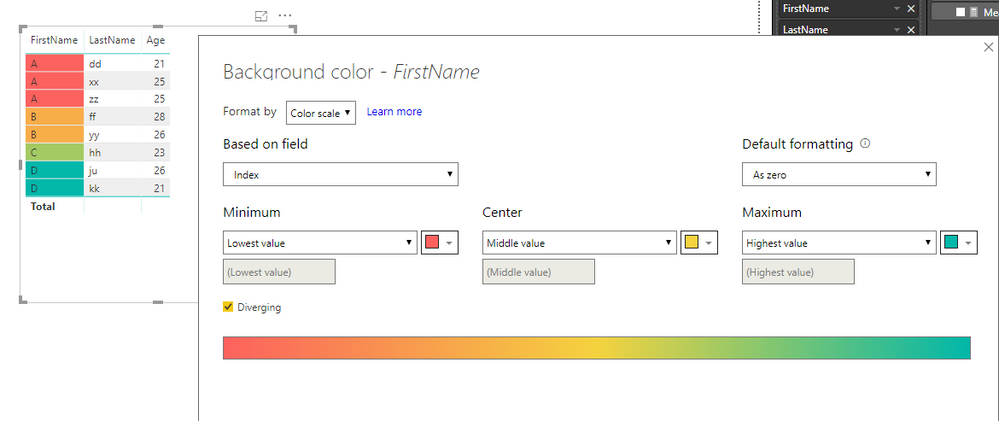
You can create below measures:
Measure = SELECTEDVALUE(Table1[FirstName]) Index = RANKX(ALLSELECTED(Table1),[Measure],,ASC,Dense)
Then, set conditional formatting as below:
Best regards,
Yuliana Gu
Thank you for your answer I tried your measure but it seems like there is a syntax error around the "Index"
Hi @Anonymous ,
What is the error?
Regards,
Yuliana Gu
Hi @v-yulgu-msft ,
It say that this syntax is incorrecthere is my measure as I follow yours
I tried to put ";" instead of "," inside the RANKX function but it's still not working
Hi @Anonymous ,
These are two separate measures.
The first one:
Measure = SELECTEDVALUE(Table1[FirstName])
The Index measure:
Index = RANKX(ALLSELECTED(Table1),[Measure],,ASC,Dense)
Best regards,
Yuliana Gu
Share feedback directly with Fabric product managers, participate in targeted research studies and influence the Fabric roadmap.
Check out the February 2026 Power BI update to learn about new features.
| User | Count |
|---|---|
| 51 | |
| 40 | |
| 37 | |
| 14 | |
| 14 |
| User | Count |
|---|---|
| 84 | |
| 69 | |
| 38 | |
| 29 | |
| 27 |