
cancel
Showing results for 
Search instead for 
Did you mean: 

Try your skills in the Power BI Dataviz World Championship! Round one ends June 26. Join now

Reply
Anonymous
Not applicable

Set conditional formatting between fields

Hi,

I would like to change the color of a row if 2 field have the same name for example if I have the table (first name, last name, age) I would like to color of the same color row who has the same first name but the problem is that by using conditionnal formatting I can deal only with values so I have no idea on how to do it or if it is possible.

Could someone help me please.

Thank you.

1 ACCEPTED SOLUTION

Hi @Anonymous ,


These are two separate measures.

The first one:

Measure = SELECTEDVALUE(Table1[FirstName])

The Index measure:

Index = 
RANKX(ALLSELECTED(Table1),[Measure],,ASC,Dense)

Best regards,

Yuliana Gu

Community Support Team _ Yuliana Gu
If this post helps, then please consider Accept it as the solution to help the other members find it more quickly.

View solution in original post

6 REPLIES 6
v-yulgu-msft
Microsoft Employee
Microsoft Employee

Hi @Anonymous ,


You can create below measures:

Measure = SELECTEDVALUE(Table1[FirstName])
Index = 
RANKX(ALLSELECTED(Table1),[Measure],,ASC,Dense)

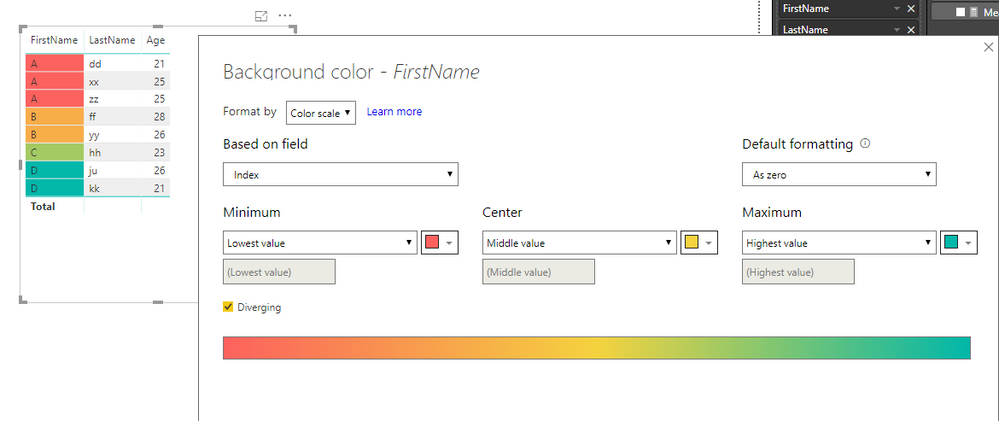
Then, set conditional formatting as below:

6.PNG

Best regards,

Yuliana Gu

Community Support Team _ Yuliana Gu
If this post helps, then please consider Accept it as the solution to help the other members find it more quickly.
Anonymous
Not applicable

Thank you for your answer I tried your measure but it seems like there is a syntax error around the "Index" 

Hi @Anonymous ,


What is the error?


Regards,

Yuliana Gu

Community Support Team _ Yuliana Gu
If this post helps, then please consider Accept it as the solution to help the other members find it more quickly.
Anonymous
Not applicable

Hi @v-yulgu-msft ,


It say that this syntax is incorrectscreen2.PNGhere is my measure  as I follow yours screen1.PNG I tried to put ";" instead of "," inside the RANKX function but it's still not working

Hi @Anonymous ,


These are two separate measures.

The first one:

Measure = SELECTEDVALUE(Table1[FirstName])

The Index measure:

Index = 
RANKX(ALLSELECTED(Table1),[Measure],,ASC,Dense)

Best regards,

Yuliana Gu

Community Support Team _ Yuliana Gu
If this post helps, then please consider Accept it as the solution to help the other members find it more quickly.
Anonymous
Not applicable

Hi @v-yulgu-msft ,


Thank you very much, you helped  me a lot solving my problem

Helpful resources

Announcements
Fabric Data Days is here Carousel

Fabric Data Days 2026

Don't miss out on Data Days, June 15 through August 7. Learn Fabric, Power BI, SQL, AI and more.

Power BI DataViz World Championships carousel

Power BI DataViz World Championships - June 2026

A new Power BI DataViz World Championship is coming this June! Don't miss out on submitting your entry.