Get certified for free when you join Fabric Data Days 2026 and dive into Fabric, Power BI, SQL, AI, and other essential data skills.
Join nowData Days is here! Join us now for 60+ days of learning, challenges, and connection. Learn more
Hello,
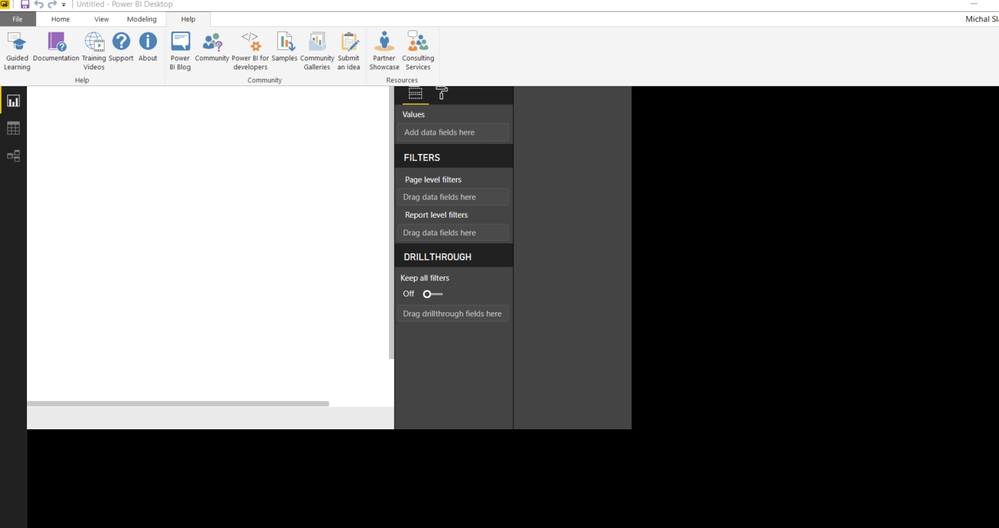
I have problem with my Power BI Desktop. In report view the screen is moved to the edge as you can see in the picture, otherwise it´s black. Yesterday it happened once, then it worked well.
I´ve already try to change page view options and reinstall Power BI Desktop, but nothing of that helped.
Thank you,
Michal Slavik
Solved! Go to Solution.
@Anonymous,
Please check if the following steps fix the above issue.
1. Press the Start key and type the world blurry into the search bar that appears.
2. In the dialog that appears, select the option: Let Windows fix apps that are blurry.
3. Restart Power BI Desktop.
Reference:
Power BI Desktop loads with a partial screen
Regards,
Lydia
Hi @Anonymous ,
Had some users on my organization with same issue this appear to solve the situation.
Thanks.
Regards,
MFelix
Regards
Miguel Félix
Proud to be a Super User!
Check out my blog: Power BI em PortuguêsThank you very much! 🙂
@Anonymous,
Please check if the following steps fix the above issue.
1. Press the Start key and type the world blurry into the search bar that appears.
2. In the dialog that appears, select the option: Let Windows fix apps that are blurry.
3. Restart Power BI Desktop.
Reference:
Power BI Desktop loads with a partial screen
Regards,
Lydia
Don't miss out on Data Days, June 15 through August 7. Learn Fabric, Power BI, SQL, AI and more.
Check out the May 2026 Power BI update to learn about new features.
| User | Count |
|---|---|
| 23 | |
| 21 | |
| 20 | |
| 17 | |
| 13 |
| User | Count |
|---|---|
| 58 | |
| 51 | |
| 37 | |
| 30 | |
| 26 |