This is best Fabric, Power BI, SQL and AI community event. How do we know? The last event sold out! Save €200 with code FABCMTY200.
Register nowA new Data Days event is coming soon! This time we’re going bigger than ever. Fabric, Power BI, SQL, AI and more. Don't miss out.
Hello,
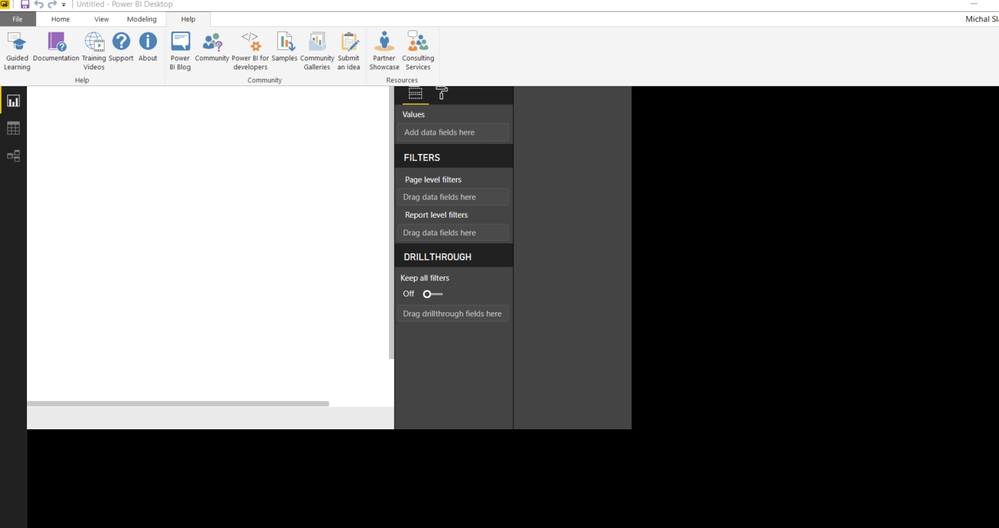
I have problem with my Power BI Desktop. In report view the screen is moved to the edge as you can see in the picture, otherwise it´s black. Yesterday it happened once, then it worked well.
I´ve already try to change page view options and reinstall Power BI Desktop, but nothing of that helped.
Thank you,
Michal Slavik
Solved! Go to Solution.
@Anonymous,
Please check if the following steps fix the above issue.
1. Press the Start key and type the world blurry into the search bar that appears.
2. In the dialog that appears, select the option: Let Windows fix apps that are blurry.
3. Restart Power BI Desktop.
Reference:
Power BI Desktop loads with a partial screen
Regards,
Lydia
Hi @Anonymous ,
Had some users on my organization with same issue this appear to solve the situation.
Thanks.
Regards,
MFelix
Regards
Miguel Félix
Proud to be a Super User!
Check out my blog: Power BI em PortuguêsThank you very much! 🙂
@Anonymous,
Please check if the following steps fix the above issue.
1. Press the Start key and type the world blurry into the search bar that appears.
2. In the dialog that appears, select the option: Let Windows fix apps that are blurry.
3. Restart Power BI Desktop.
Reference:
Power BI Desktop loads with a partial screen
Regards,
Lydia
Check out the May 2026 Power BI update to learn about new features.
Sign up to receive a private message when registration opens and key events begin.
If you have recently started exploring Fabric, we'd love to hear how it's going. Your feedback can help with product improvements.
| User | Count |
|---|---|
| 31 | |
| 26 | |
| 23 | |
| 22 | |
| 15 |
| User | Count |
|---|---|
| 63 | |
| 45 | |
| 28 | |
| 24 | |
| 22 |