Join us at FabCon Atlanta from March 16 - 20, 2026, for the ultimate Fabric, Power BI, AI and SQL community-led event. Save $200 with code FABCOMM.
Register now!The Power BI Data Visualization World Championships is back! Get ahead of the game and start preparing now! Learn more
I searched as much I could, and I could not find anyone with this same issue, so, if it has already been posted, I appologize.
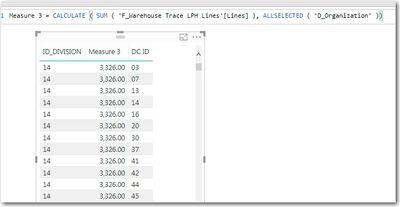
When I use ALL() in a measure, it causes the related data to repeat.
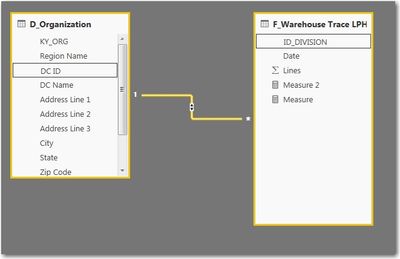
In the data, I have ID_DIVISION in a fact table, that is related to DC ID in a dimension table. The relationships are setup as many to one, with a single direction filter.
When I create the below measure, everything lines up (left table in screenshot below)
Measure = CALCULATE(sum('F_Warehouse Trace LPH Lines'[Lines]))CALCULATE(sum('F_Warehouse Trace LPH Lines'[Lines]),all('F_Warehouse Trace LPH Lines'))
@mmyers2 ,
To be general, you may modify your measure using DAX like pattern below:
Measure =
CALCULATE (
SUM ( 'F_Warehouse Trace LPH Lines'[Lines] ),
ALLSELECTED ( 'D_Organization' )
)
Community Support Team _ Jimmy Tao
If this post helps, then please consider Accept it as the solution to help the other members find it more quickly.
Sorry, but that did not work. This is really driving me nuts since I want to use DC ID as a drill through, and also have other metrics on the same report page that crossfilter on DC ID.
The way this is interacting seems very odd to me.
The Power BI Data Visualization World Championships is back! Get ahead of the game and start preparing now!
| User | Count |
|---|---|
| 37 | |
| 33 | |
| 32 | |
| 31 | |
| 26 |
| User | Count |
|---|---|
| 134 | |
| 96 | |
| 78 | |
| 67 | |
| 65 |