Share feedback directly with Fabric product managers, participate in targeted research studies and influence the Fabric roadmap.
Sign up nowGet Fabric certified for FREE! Don't miss your chance! Learn more
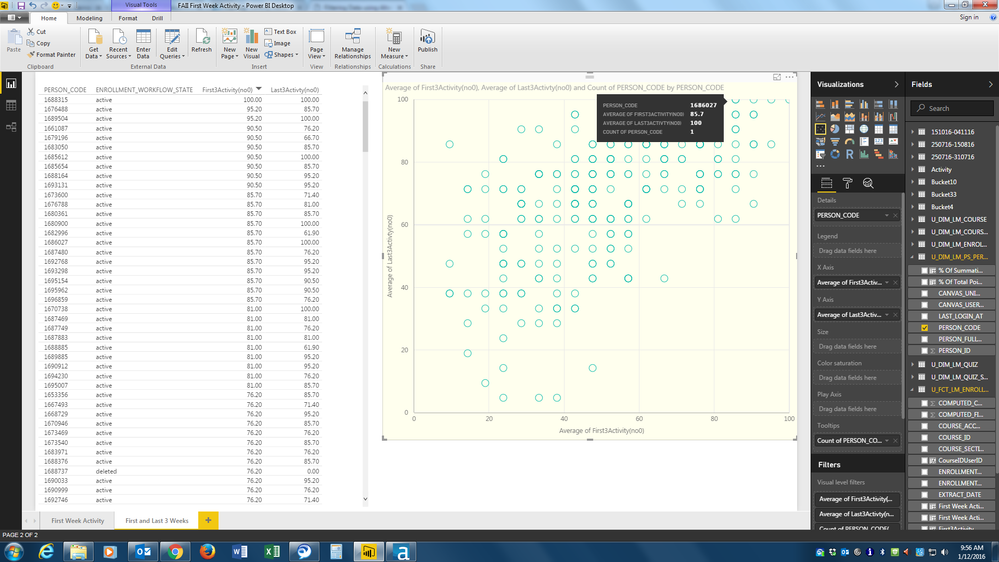
I have some data in a scatter chart but where I know two people occupy the same position the chart only gives me a count of one.
The table on the left shows 2 people that have a score of 85.7 on the x-axis and 100 on the y-axis (Person Codes 1680900 and 1686027). When I put my curser on the relevant marker on the scatter chart I get a Person Code count of only 1 (1686027). However, if I right click on that marker and exclude that person it still shows me a Person Code count of 1 but gives the other person code (1680900).
Why doesn't the Tooltip give me a count of 2 Person Codes here?
Thanks,
DHB
Solved! Go to Solution.
I've got reply from Power BI team - This is by design. Scatter groups by the Details field (and/or the Legend field), it does not group by X/Y pairs.
Best Regards,
Herbert
Hi @DHB,
I can reproduce this issue in my environment and already reported internally. Will update here once I get any information.
Best Regards,
Qiuyun Yu
Thank you. It'll be interesting to hear anything you find out.
I've got reply from Power BI team - This is by design. Scatter groups by the Details field (and/or the Legend field), it does not group by X/Y pairs.
Best Regards,
Herbert
Thank you for your reply. It's a shame it can't give that information though.
Share feedback directly with Fabric product managers, participate in targeted research studies and influence the Fabric roadmap.
| User | Count |
|---|---|
| 57 | |
| 53 | |
| 42 | |
| 18 | |
| 14 |
| User | Count |
|---|---|
| 111 | |
| 104 | |
| 36 | |
| 28 | |
| 27 |