Get certified for free when you join Fabric Data Days 2026 and dive into Fabric, Power BI, SQL, AI, and other essential data skills.
Join nowJuly 7 - July 17 | Round 2 of the Power BI Dataviz World Championships. Don't miss your chance! Learn more
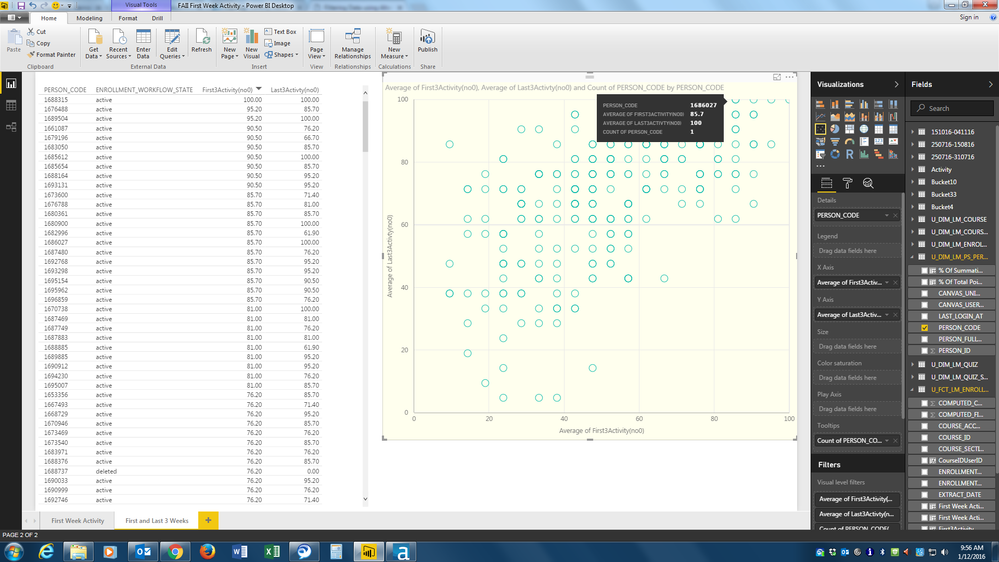
I have some data in a scatter chart but where I know two people occupy the same position the chart only gives me a count of one.
The table on the left shows 2 people that have a score of 85.7 on the x-axis and 100 on the y-axis (Person Codes 1680900 and 1686027). When I put my curser on the relevant marker on the scatter chart I get a Person Code count of only 1 (1686027). However, if I right click on that marker and exclude that person it still shows me a Person Code count of 1 but gives the other person code (1680900).
Why doesn't the Tooltip give me a count of 2 Person Codes here?
Thanks,
DHB
Solved! Go to Solution.
I've got reply from Power BI team - This is by design. Scatter groups by the Details field (and/or the Legend field), it does not group by X/Y pairs.
Best Regards,
Herbert
Hi @DHB,
I can reproduce this issue in my environment and already reported internally. Will update here once I get any information.
Best Regards,
Qiuyun Yu
Thank you. It'll be interesting to hear anything you find out.
I've got reply from Power BI team - This is by design. Scatter groups by the Details field (and/or the Legend field), it does not group by X/Y pairs.
Best Regards,
Herbert
Thank you for your reply. It's a shame it can't give that information though.
Join us in Barcelona for FabCon and SQLCon, the Fabric, Power BI, SQL, and AI community event. Save €200 with code FABCMTY200.
Join Fabric Data Days 2026: 60 days of free live/on-demand sessions, challenges, study groups, and certification opportunities.
| User | Count |
|---|---|
| 21 | |
| 18 | |
| 18 | |
| 17 | |
| 13 |
| User | Count |
|---|---|
| 61 | |
| 52 | |
| 47 | |
| 40 | |
| 38 |