Join us at FabCon Atlanta from March 16 - 20, 2026, for the ultimate Fabric, Power BI, AI and SQL community-led event. Save $200 with code FABCOMM.
Register now!The Power BI Data Visualization World Championships is back! It's time to submit your entry. Live now!
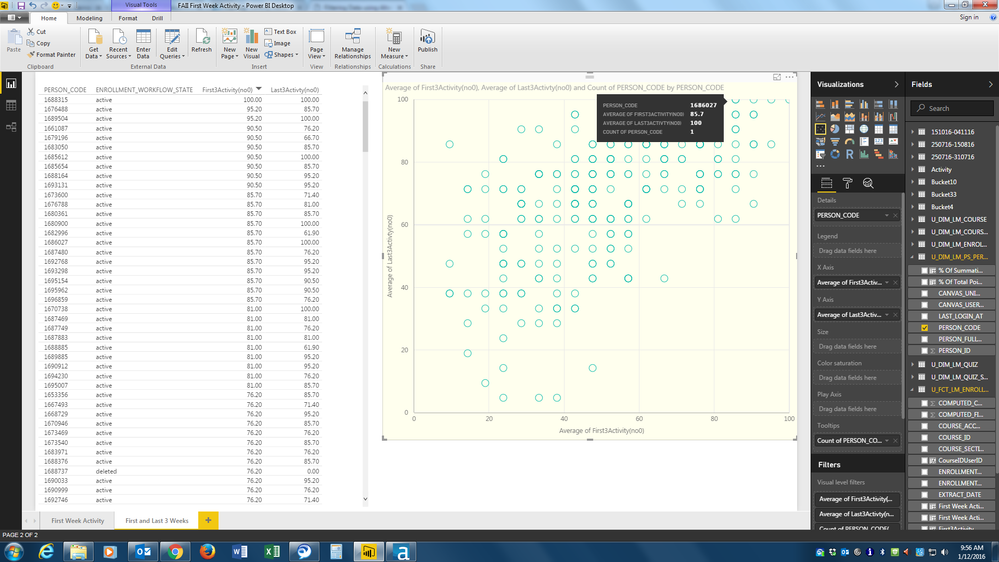
I have some data in a scatter chart but where I know two people occupy the same position the chart only gives me a count of one.
The table on the left shows 2 people that have a score of 85.7 on the x-axis and 100 on the y-axis (Person Codes 1680900 and 1686027). When I put my curser on the relevant marker on the scatter chart I get a Person Code count of only 1 (1686027). However, if I right click on that marker and exclude that person it still shows me a Person Code count of 1 but gives the other person code (1680900).
Why doesn't the Tooltip give me a count of 2 Person Codes here?
Thanks,
DHB
Solved! Go to Solution.
I've got reply from Power BI team - This is by design. Scatter groups by the Details field (and/or the Legend field), it does not group by X/Y pairs.
Best Regards,
Herbert
Hi @DHB,
I can reproduce this issue in my environment and already reported internally. Will update here once I get any information.
Best Regards,
Qiuyun Yu
Thank you. It'll be interesting to hear anything you find out.
I've got reply from Power BI team - This is by design. Scatter groups by the Details field (and/or the Legend field), it does not group by X/Y pairs.
Best Regards,
Herbert
Thank you for your reply. It's a shame it can't give that information though.
The Power BI Data Visualization World Championships is back! It's time to submit your entry.
Check out the January 2026 Power BI update to learn about new features.
| User | Count |
|---|---|
| 56 | |
| 42 | |
| 41 | |
| 21 | |
| 21 |
| User | Count |
|---|---|
| 150 | |
| 107 | |
| 64 | |
| 36 | |
| 36 |