Don't miss your chance to take exam DP-600 or DP-700 on us!
Request nowLearn from the best! Meet the four finalists headed to the FINALS of the Power BI Dataviz World Championships! Register now
Tablemeasure = Union( selectcolumns(Table A,"Opening_Date", Table A[Opening_Date]), selectcolumns(Table B,"Business_Date", Table B[Business_Date]), )
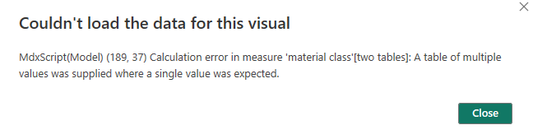
I created a measure using this format above but when I try to put it into a visual I get the error below. Anyone have an idea of what I might be doing wrong?
Solved! Go to Solution.
If you need a list of dates for a visual, create a calculated table instead of a measure :
CombinedDatesTable = UNION(
SELECTCOLUMNS(TableA, "Date", TableA[Opening_Date]),
SELECTCOLUMNS(TableB, "Date", TableB[Business_Date])
)then for the measure :
UniqueDateCount = DISTINCTCOUNT(UNION(SELECTCOLUMNS(TableA, "Date", TableA[Opening_Date]), SELECTCOLUMNS(TableB, "Date", TableB[Business_Date])))
If you need a list of dates for a visual, create a calculated table instead of a measure :
CombinedDatesTable = UNION(
SELECTCOLUMNS(TableA, "Date", TableA[Opening_Date]),
SELECTCOLUMNS(TableB, "Date", TableB[Business_Date])
)then for the measure :
UniqueDateCount = DISTINCTCOUNT(UNION(SELECTCOLUMNS(TableA, "Date", TableA[Opening_Date]), SELECTCOLUMNS(TableB, "Date", TableB[Business_Date])))
This is what I created but I'm only getting the Material column in the resulting table?
Can you please share your pbix file ?
Your solution worked, I just had to tweek it a bit for my situation. I accepted your solution.
Share feedback directly with Fabric product managers, participate in targeted research studies and influence the Fabric roadmap.
Check out the February 2026 Power BI update to learn about new features.
| User | Count |
|---|---|
| 51 | |
| 40 | |
| 37 | |
| 14 | |
| 14 |
| User | Count |
|---|---|
| 85 | |
| 69 | |
| 38 | |
| 29 | |
| 27 |