cancel
Showing results for 
Search instead for 
Did you mean: 

The Power BI Data Visualization World Championships is back! Get ahead of the game and start preparing now! Learn more

Reply
ovetteabejuela
Impactful Individual

PowerQuery: Merge Queries

It appears that Merge Queries  are case-sensitive, what are you recommendations for composite keys that are of text type?


build another column that transforms the column to lower-case/uppers for both tables? or is there a much more elegant way of doing this?

1 ACCEPTED SOLUTION
MarcelBeug
Community Champion
Community Champion

It would be prefered to have numeric keys.

If you need to stick to text, then I think your proposal is the best suggestion.


Table.NestedJoin has an additional parameter "keyEqualityComparers" that would suggest the possibility to use case-insensitive comparison, but this doesn't seem to work with local evaluation (maybe it works with a database source and query folding).

This parameter was discussed here.


The following code performs a case sensitive left outerjoin from Table1 to Table2, however "performs"  is not very applicable as this is a real performance killer and I wouldn't recommend it for any tables with more than 100 records.


let
    Source1 = Table.Buffer(Table1),
    Source2 = Table.Buffer(Table2),
    #"Added Custom" = Table.AddColumn(Source1, "Table2", (Record1) => Table.SelectRows(Source2, (Record2) => Comparer.Equals(Comparer.OrdinalIgnoreCase, Record1[Key1], Record2[Key2]))),
    #"Expanded Table2" = Table.ExpandTableColumn(#"Added Custom", "Table2", {"Key2", "Value2"}, {"Key2", "Value2"})
in
    #"Expanded Table2"


Specializing in Power Query Formula Language (M)

View solution in original post

5 REPLIES 5
MarcelBeug
Community Champion
Community Champion

It would be prefered to have numeric keys.

If you need to stick to text, then I think your proposal is the best suggestion.


Table.NestedJoin has an additional parameter "keyEqualityComparers" that would suggest the possibility to use case-insensitive comparison, but this doesn't seem to work with local evaluation (maybe it works with a database source and query folding).

This parameter was discussed here.


The following code performs a case sensitive left outerjoin from Table1 to Table2, however "performs"  is not very applicable as this is a real performance killer and I wouldn't recommend it for any tables with more than 100 records.


let
    Source1 = Table.Buffer(Table1),
    Source2 = Table.Buffer(Table2),
    #"Added Custom" = Table.AddColumn(Source1, "Table2", (Record1) => Table.SelectRows(Source2, (Record2) => Comparer.Equals(Comparer.OrdinalIgnoreCase, Record1[Key1], Record2[Key2]))),
    #"Expanded Table2" = Table.ExpandTableColumn(#"Added Custom", "Table2", {"Key2", "Value2"}, {"Key2", "Value2"})
in
    #"Expanded Table2"


Specializing in Power Query Formula Language (M)

Thanks Marcel, at least I have 2 choices now.

Anonymous
Not applicable

Its an old post.

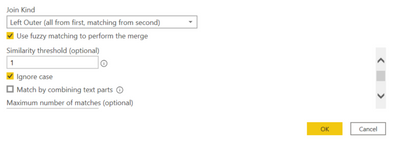
We do have a fuzzy merge option now.

Use [IgnoreCase=true, Threshold=1.0] should do a case agonostic merge.


Anonymous
Not applicable

Thanks @Anonymous .


It resolved my needs and those who are looking for the solution,


KarthikKV_0-1626241163469.png

You can also refer to the below article,


https://www.ehansalytics.com/blog/2020/4/27/case-insensitive-merges-in-power-query


Thanks,

Karthik

Anonymous
Not applicable

But as Mat mention in artcilce

 
Unfortunately this seems to ignore + - signs.

I have three items:

19719201
19719201+
19719201-

With this fuzzy matching it's returning all three for item 19719201

Helpful resources

Announcements
Power BI DataViz World Championships

Power BI Dataviz World Championships

The Power BI Data Visualization World Championships is back! Get ahead of the game and start preparing now!

December 2025 Power BI Update Carousel

Power BI Monthly Update - December 2025

Check out the December 2025 Power BI Holiday Recap!

FabCon Atlanta 2026 carousel

FabCon Atlanta 2026

Join us at FabCon Atlanta, March 16-20, for the ultimate Fabric, Power BI, AI and SQL community-led event. Save $200 with code FABCOMM.