Get certified for free when you join Fabric Data Days 2026 and dive into Fabric, Power BI, SQL, AI, and other essential data skills.
Join nowJuly 7 - July 17 | Round 2 of the Power BI Dataviz World Championships. Don't miss your chance! Learn more
It appears that Merge Queries are case-sensitive, what are you recommendations for composite keys that are of text type?
build another column that transforms the column to lower-case/uppers for both tables? or is there a much more elegant way of doing this?
Solved! Go to Solution.
It would be prefered to have numeric keys.
If you need to stick to text, then I think your proposal is the best suggestion.
Table.NestedJoin has an additional parameter "keyEqualityComparers" that would suggest the possibility to use case-insensitive comparison, but this doesn't seem to work with local evaluation (maybe it works with a database source and query folding).
This parameter was discussed here.
The following code performs a case sensitive left outerjoin from Table1 to Table2, however "performs" is not very applicable as this is a real performance killer and I wouldn't recommend it for any tables with more than 100 records.
let
Source1 = Table.Buffer(Table1),
Source2 = Table.Buffer(Table2),
#"Added Custom" = Table.AddColumn(Source1, "Table2", (Record1) => Table.SelectRows(Source2, (Record2) => Comparer.Equals(Comparer.OrdinalIgnoreCase, Record1[Key1], Record2[Key2]))),
#"Expanded Table2" = Table.ExpandTableColumn(#"Added Custom", "Table2", {"Key2", "Value2"}, {"Key2", "Value2"})
in
#"Expanded Table2"
It would be prefered to have numeric keys.
If you need to stick to text, then I think your proposal is the best suggestion.
Table.NestedJoin has an additional parameter "keyEqualityComparers" that would suggest the possibility to use case-insensitive comparison, but this doesn't seem to work with local evaluation (maybe it works with a database source and query folding).
This parameter was discussed here.
The following code performs a case sensitive left outerjoin from Table1 to Table2, however "performs" is not very applicable as this is a real performance killer and I wouldn't recommend it for any tables with more than 100 records.
let
Source1 = Table.Buffer(Table1),
Source2 = Table.Buffer(Table2),
#"Added Custom" = Table.AddColumn(Source1, "Table2", (Record1) => Table.SelectRows(Source2, (Record2) => Comparer.Equals(Comparer.OrdinalIgnoreCase, Record1[Key1], Record2[Key2]))),
#"Expanded Table2" = Table.ExpandTableColumn(#"Added Custom", "Table2", {"Key2", "Value2"}, {"Key2", "Value2"})
in
#"Expanded Table2"
Thanks Marcel, at least I have 2 choices now.
Its an old post.
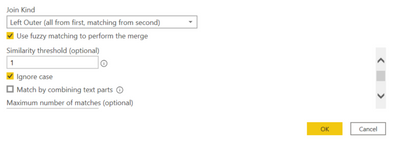
We do have a fuzzy merge option now.
Use [IgnoreCase=true, Threshold=1.0] should do a case agonostic merge.
Thanks @Anonymous .
It resolved my needs and those who are looking for the solution,
You can also refer to the below article,
https://www.ehansalytics.com/blog/2020/4/27/case-insensitive-merges-in-power-query
Thanks,
Karthik
But as Mat mention in artcilce
Unfortunately this seems to ignore + - signs.I have three items:
19719201
19719201+
19719201-With this fuzzy matching it's returning all three for item 19719201
Join us in Barcelona for FabCon and SQLCon, the Fabric, Power BI, SQL, and AI community event. Save €200 with code FABCMTY200.
Join Fabric Data Days 2026: 60 days of free live/on-demand sessions, challenges, study groups, and certification opportunities.
| User | Count |
|---|---|
| 22 | |
| 22 | |
| 18 | |
| 17 | |
| 13 |
| User | Count |
|---|---|
| 63 | |
| 50 | |
| 46 | |
| 41 | |
| 39 |