This time we’re going bigger than ever. Fabric, Power BI, SQL, AI and more. We're covering it all. You won't want to miss it.
Learn moreGet Fabric Certified for FREE during AI Skills Fest. This week only. Secure your voucher now.
Hi guys,
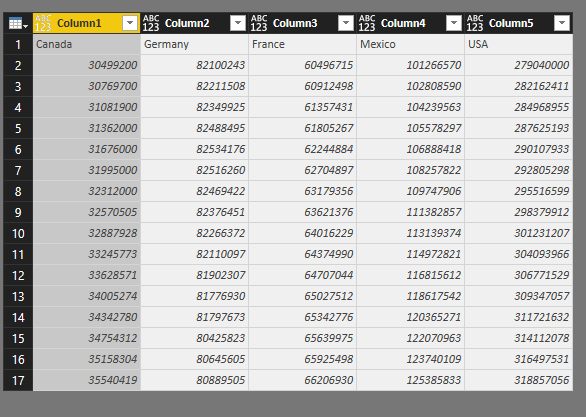
I have a dataset like below
I'm finding the way to pivot years into a column named Years. And 5 countries shall be in 5 column headers.
If I use Transpose then I seem to lose all years.
Solved! Go to Solution.
Please follow steps below:
1. Unpivot all years columns.
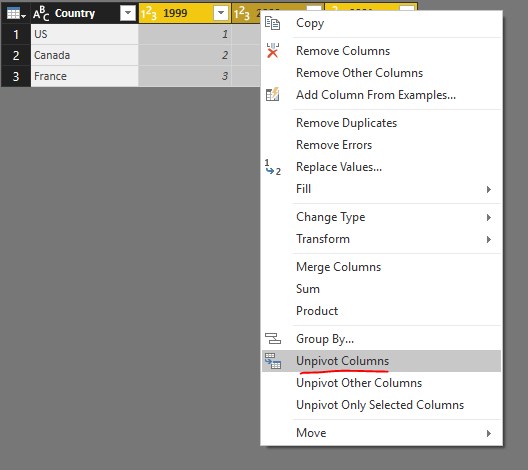
2. Then rename the Attribute column into Year.
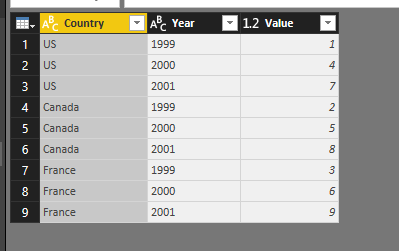
3. Pivot Country column.
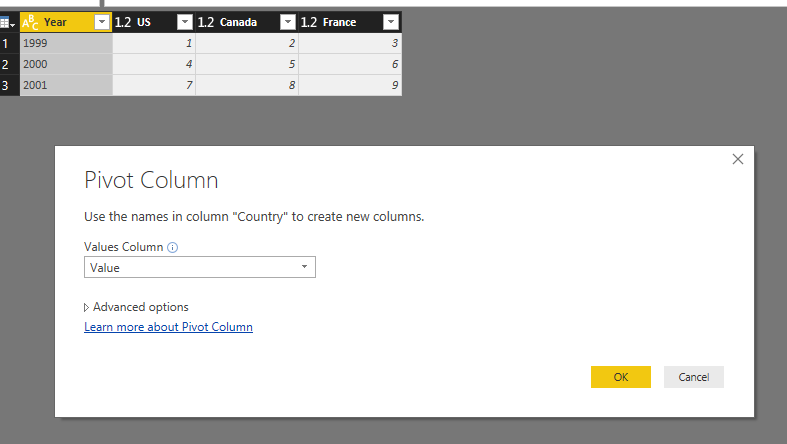
See entire M query:
let
Source = Table.FromRows(Json.Document(Binary.Decompress(Binary.FromText("i45WCg1W0lEyBGITIDZXitWJVnJOzEtMSQRyjYDYFIgtwMJuRYl5yalArjEQmwGxpVJsLAA=", BinaryEncoding.Base64), Compression.Deflate)), let _t = ((type text) meta [Serialized.Text = true]) in type table [Country = _t, #"1999" = _t, #"2000" = _t, #"2001" = _t]),
#"Changed Type" = Table.TransformColumnTypes(Source,{{"Country", type text}, {"1999", Int64.Type}, {"2000", Int64.Type}, {"2001", Int64.Type}}),
#"Unpivoted Columns" = Table.UnpivotOtherColumns(#"Changed Type", {"Country"}, "Attribute", "Value"),
#"Renamed Columns" = Table.RenameColumns(#"Unpivoted Columns",{{"Attribute", "Year"}}),
#"Pivoted Column" = Table.Pivot(#"Renamed Columns", List.Distinct(#"Renamed Columns"[Country]), "Country", "Value", List.Sum)
in
#"Pivoted Column"
Regards,
Please follow steps below:
1. Unpivot all years columns.
2. Then rename the Attribute column into Year.
3. Pivot Country column.
See entire M query:
let
Source = Table.FromRows(Json.Document(Binary.Decompress(Binary.FromText("i45WCg1W0lEyBGITIDZXitWJVnJOzEtMSQRyjYDYFIgtwMJuRYl5yalArjEQmwGxpVJsLAA=", BinaryEncoding.Base64), Compression.Deflate)), let _t = ((type text) meta [Serialized.Text = true]) in type table [Country = _t, #"1999" = _t, #"2000" = _t, #"2001" = _t]),
#"Changed Type" = Table.TransformColumnTypes(Source,{{"Country", type text}, {"1999", Int64.Type}, {"2000", Int64.Type}, {"2001", Int64.Type}}),
#"Unpivoted Columns" = Table.UnpivotOtherColumns(#"Changed Type", {"Country"}, "Attribute", "Value"),
#"Renamed Columns" = Table.RenameColumns(#"Unpivoted Columns",{{"Attribute", "Year"}}),
#"Pivoted Column" = Table.Pivot(#"Renamed Columns", List.Distinct(#"Renamed Columns"[Country]), "Country", "Value", List.Sum)
in
#"Pivoted Column"
Regards,
Absolutely Great !!! you saved lot of working hours 🙂
Check out the May 2026 Power BI update to learn about new features.
Sign up to receive a private message when registration opens and key events begin.
If you have recently started exploring Fabric, we'd love to hear how it's going. Your feedback can help with product improvements.
| User | Count |
|---|---|
| 22 | |
| 22 | |
| 21 | |
| 21 | |
| 16 |
| User | Count |
|---|---|
| 55 | |
| 54 | |
| 47 | |
| 26 | |
| 24 |