
cancel
Showing results for 
Search instead for 
Did you mean: 

Vote for your favorite vizzies from the Power BI Dataviz World Championship submissions. Vote now!

Reply
s15
Helper III
Helper III

Pivot multiple columns


Hi guys,


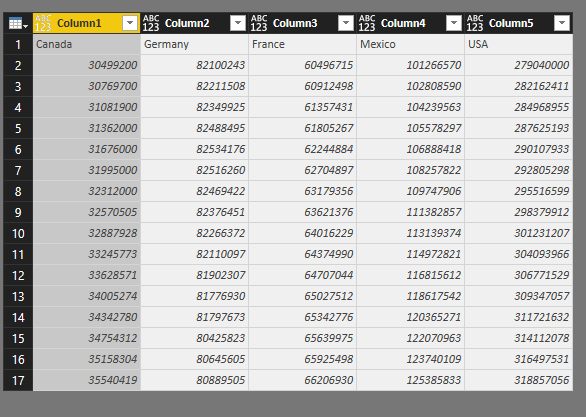
I have a dataset like below


population.PNG


I'm finding the way to pivot years into a column named Years. And 5 countries shall be in 5 column headers.


If I use Transpose then I seem to lose all years.


transpore.PNG

1 ACCEPTED SOLUTION
v-sihou-msft
Microsoft Employee
Microsoft Employee

@s15


Please follow steps below:


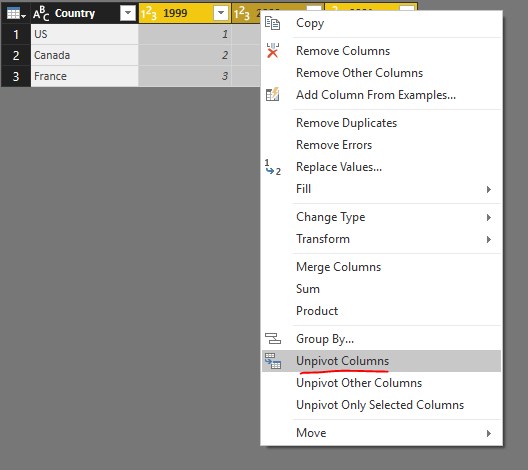
1. Unpivot all years columns.


123.PNG


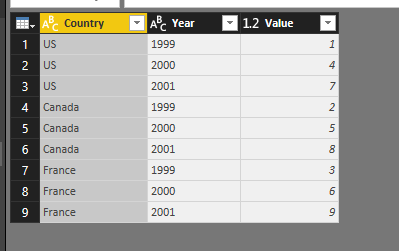
2. Then rename the Attribute column into Year.


234.PNG


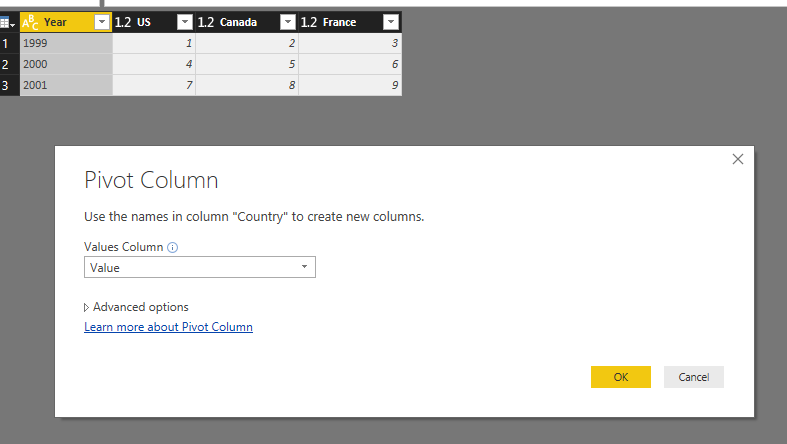
3. Pivot Country column.


345.PNG


See entire M query:


let
    Source = Table.FromRows(Json.Document(Binary.Decompress(Binary.FromText("i45WCg1W0lEyBGITIDZXitWJVnJOzEtMSQRyjYDYFIgtwMJuRYl5yalArjEQmwGxpVJsLAA=", BinaryEncoding.Base64), Compression.Deflate)), let _t = ((type text) meta [Serialized.Text = true]) in type table [Country = _t, #"1999" = _t, #"2000" = _t, #"2001" = _t]),
    #"Changed Type" = Table.TransformColumnTypes(Source,{{"Country", type text}, {"1999", Int64.Type}, {"2000", Int64.Type}, {"2001", Int64.Type}}),
    #"Unpivoted Columns" = Table.UnpivotOtherColumns(#"Changed Type", {"Country"}, "Attribute", "Value"),
    #"Renamed Columns" = Table.RenameColumns(#"Unpivoted Columns",{{"Attribute", "Year"}}),
    #"Pivoted Column" = Table.Pivot(#"Renamed Columns", List.Distinct(#"Renamed Columns"[Country]), "Country", "Value", List.Sum)
in
    #"Pivoted Column"

Regards,


View solution in original post

3 REPLIES 3
v-sihou-msft
Microsoft Employee
Microsoft Employee

@s15


Please follow steps below:


1. Unpivot all years columns.


123.PNG


2. Then rename the Attribute column into Year.


234.PNG


3. Pivot Country column.


345.PNG


See entire M query:


let
    Source = Table.FromRows(Json.Document(Binary.Decompress(Binary.FromText("i45WCg1W0lEyBGITIDZXitWJVnJOzEtMSQRyjYDYFIgtwMJuRYl5yalArjEQmwGxpVJsLAA=", BinaryEncoding.Base64), Compression.Deflate)), let _t = ((type text) meta [Serialized.Text = true]) in type table [Country = _t, #"1999" = _t, #"2000" = _t, #"2001" = _t]),
    #"Changed Type" = Table.TransformColumnTypes(Source,{{"Country", type text}, {"1999", Int64.Type}, {"2000", Int64.Type}, {"2001", Int64.Type}}),
    #"Unpivoted Columns" = Table.UnpivotOtherColumns(#"Changed Type", {"Country"}, "Attribute", "Value"),
    #"Renamed Columns" = Table.RenameColumns(#"Unpivoted Columns",{{"Attribute", "Year"}}),
    #"Pivoted Column" = Table.Pivot(#"Renamed Columns", List.Distinct(#"Renamed Columns"[Country]), "Country", "Value", List.Sum)
in
    #"Pivoted Column"

Regards,


Absolutely Great !!! you saved lot of working hours 🙂

Thank you @v-sihou-msft That works perfectly!

Helpful resources

Announcements
Power BI DataViz World Championships

Power BI Dataviz World Championships

Vote for your favorite vizzies from the Power BI World Championship submissions!

Sticker Challenge 2026 Carousel

Join our Community Sticker Challenge 2026

If you love stickers, then you will definitely want to check out our Community Sticker Challenge!

January Power BI Update Carousel

Power BI Monthly Update - January 2026

Check out the January 2026 Power BI update to learn about new features.

FabCon Atlanta 2026 carousel

FabCon Atlanta 2026

Join us at FabCon Atlanta, March 16-20, for the ultimate Fabric, Power BI, AI and SQL community-led event. Save $200 with code FABCOMM.