Don't miss your chance to take the Fabric Data Engineer (DP-600) exam for FREE! Find out how by attending the DP-600 session on April 23rd (pacific time), live or on-demand.
Learn moreNext up in the FabCon + SQLCon recap series: The roadmap for Microsoft SQL and Maximizing Developer experiences in Fabric. All sessions are available on-demand after the live show. Register now
Hi guys,
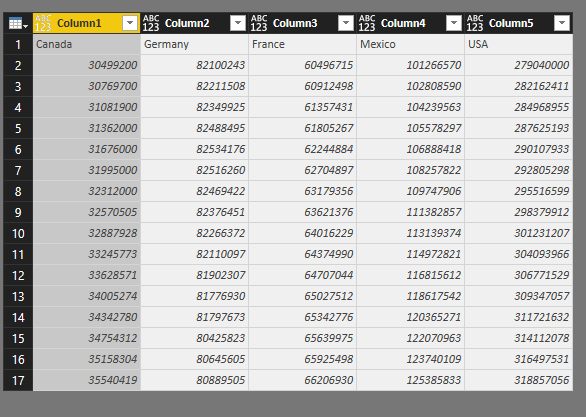
I have a dataset like below
I'm finding the way to pivot years into a column named Years. And 5 countries shall be in 5 column headers.
If I use Transpose then I seem to lose all years.
Solved! Go to Solution.
Please follow steps below:
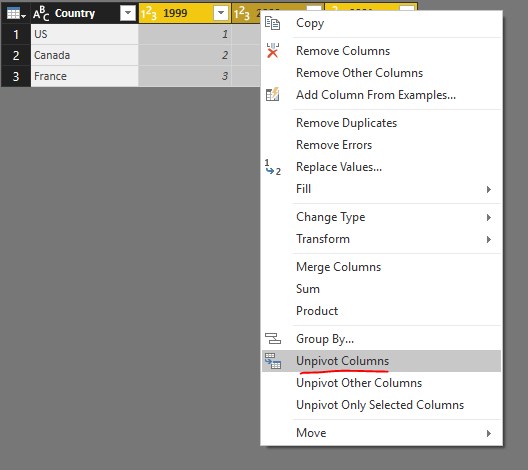
1. Unpivot all years columns.
2. Then rename the Attribute column into Year.
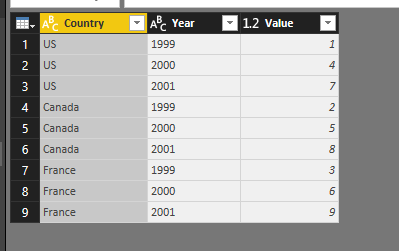
3. Pivot Country column.
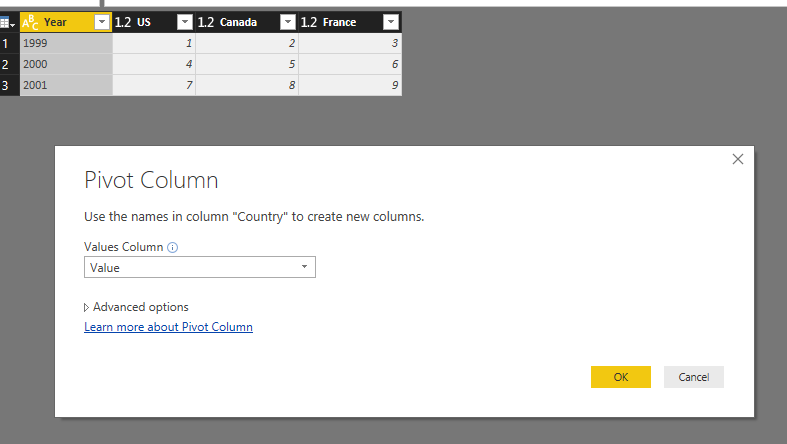
See entire M query:
let
Source = Table.FromRows(Json.Document(Binary.Decompress(Binary.FromText("i45WCg1W0lEyBGITIDZXitWJVnJOzEtMSQRyjYDYFIgtwMJuRYl5yalArjEQmwGxpVJsLAA=", BinaryEncoding.Base64), Compression.Deflate)), let _t = ((type text) meta [Serialized.Text = true]) in type table [Country = _t, #"1999" = _t, #"2000" = _t, #"2001" = _t]),
#"Changed Type" = Table.TransformColumnTypes(Source,{{"Country", type text}, {"1999", Int64.Type}, {"2000", Int64.Type}, {"2001", Int64.Type}}),
#"Unpivoted Columns" = Table.UnpivotOtherColumns(#"Changed Type", {"Country"}, "Attribute", "Value"),
#"Renamed Columns" = Table.RenameColumns(#"Unpivoted Columns",{{"Attribute", "Year"}}),
#"Pivoted Column" = Table.Pivot(#"Renamed Columns", List.Distinct(#"Renamed Columns"[Country]), "Country", "Value", List.Sum)
in
#"Pivoted Column"
Regards,
Please follow steps below:
1. Unpivot all years columns.
2. Then rename the Attribute column into Year.
3. Pivot Country column.
See entire M query:
let
Source = Table.FromRows(Json.Document(Binary.Decompress(Binary.FromText("i45WCg1W0lEyBGITIDZXitWJVnJOzEtMSQRyjYDYFIgtwMJuRYl5yalArjEQmwGxpVJsLAA=", BinaryEncoding.Base64), Compression.Deflate)), let _t = ((type text) meta [Serialized.Text = true]) in type table [Country = _t, #"1999" = _t, #"2000" = _t, #"2001" = _t]),
#"Changed Type" = Table.TransformColumnTypes(Source,{{"Country", type text}, {"1999", Int64.Type}, {"2000", Int64.Type}, {"2001", Int64.Type}}),
#"Unpivoted Columns" = Table.UnpivotOtherColumns(#"Changed Type", {"Country"}, "Attribute", "Value"),
#"Renamed Columns" = Table.RenameColumns(#"Unpivoted Columns",{{"Attribute", "Year"}}),
#"Pivoted Column" = Table.Pivot(#"Renamed Columns", List.Distinct(#"Renamed Columns"[Country]), "Country", "Value", List.Sum)
in
#"Pivoted Column"
Regards,
Absolutely Great !!! you saved lot of working hours 🙂
If you have recently started exploring Fabric, we'd love to hear how it's going. Your feedback can help with product improvements.
A new Power BI DataViz World Championship is coming this June! Don't miss out on submitting your entry.
Experience the highlights from FabCon & SQLCon, available live and on-demand starting April 14th.
| User | Count |
|---|---|
| 48 | |
| 40 | |
| 40 | |
| 20 | |
| 16 |
| User | Count |
|---|---|
| 70 | |
| 67 | |
| 32 | |
| 27 | |
| 26 |