Don't miss your chance to take the Fabric Data Engineer (DP-600) exam for FREE! Find out how by watching the DP-600 session on-demand now through April 28th.
Learn moreJoin the FabCon + SQLCon recap series. Up next: Power BI, Real-Time Intelligence, IQ and AI, and Data Factory take center stage. All sessions are available on-demand after the live show. Register now
Hi,
I have a Power BI template file which has saved query. e.g ("Select Employee name where emp id > "Variable"). Programatically using C# I need to silently instantiate the PBIT file and pass a Value (say 1200) to the "Variable" in the query. My question is, how I can achieve passing the Value of 1200 to the "Variable" variable in the saved query? Any API
TIA
Hi @sprasad,
Based on my research, you could refer to below link:
https://community.powerbi.com/t5/Desktop/How-to-edit-an-existing-direct-query/td-p/217857
Regards,
Daniel He
I am looking for a proper API code where programatically I can accept a value from an existing text or xls file and input it in the existing query in the PBIT file and create my data visualization
I know the way how to do this porcess manually but I wanted to automate the whole process.
Are you using Direct Query? If not, do you need to use the template?
In imported mode you can reference a text file in the Query Editor, so even though it's the same query from PowerBI perspective you can effectively use it as a parameter
Let me explain it better.
1. I have a PBIT file which contains a query. This PBIT file is created using the Standalone Power BI Desktop. This query fetches the records from the SQL Server table based on the ProductVersion.
2. ProductVersion is now the parameterized field for me in the query and the input to the ProductVersion will change whenever needed. The query is like "Select * from ProductData where ProductVersion = '"&ProductVersion&"'
3. Once I invoke the PBIT file I will get the below dialog.
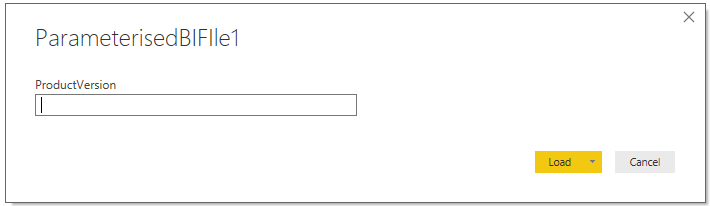
4. In the ProductVersion I can manualy input the value as 1001 and click Load and the data/visualization gets loaded.
5. I am using the data Connectivity mode as "Import".
My requirement:
In another C# program I need to read the SQL Server tables and check for the version no '1001' and store it in a variable. I can do this.
1. Using Power BI APIs or any other process/technique I need to pass the Value '1001 from the variable silently to the Power BI query mentioned in Step 2. I am looking for help or idea on how to achieve this.
All this I need to do in the Power BI Desktop only.
Any clue or solution for the above?
Check out the April 2026 Power BI update to learn about new features.
If you have recently started exploring Fabric, we'd love to hear how it's going. Your feedback can help with product improvements.
A new Power BI DataViz World Championship is coming this June! Don't miss out on submitting your entry.
| User | Count |
|---|---|
| 48 | |
| 40 | |
| 38 | |
| 20 | |
| 17 |
| User | Count |
|---|---|
| 68 | |
| 65 | |
| 30 | |
| 26 | |
| 25 |