cancel
Showing results for 
Search instead for 
Did you mean: 

Learn from the best! Meet the four finalists headed to the FINALS of the Power BI Dataviz World Championships! Register now

Reply
cslarun
Frequent Visitor

ODBC Connection Issue

Hi, I am new to Power BI and I am trying to connect to a Oracle database which has a very huge data in it. I am using ODBC option to connect. I have created a DSN and using the same in ODBC. Once I select the DSN and select OK, I receive an error message saying - "Array Dimensions Exceeded Supported Range". Please help me. Thanks.

3 REPLIES 3
Anonymous
Not applicable

@cslarun,

Why not directly use the built-in Oracle connector and DirectQuery mode in Power BI Desktop to connect to your database?

Regards,
Lydia

Hi Lydia,


Thanks for replying. I also downloaded the below mentioned Oracle db access client using the below link and tried connecting to the oracle database.

But I receive the following mentioned error -"Details: "Oracle: ORA-12170: TNS:Connect timeout occurred". 


Please help me in direct query. How do we query directly and any sample query with join statements.


Thanks,

Arun

Anonymous
Not applicable

@cslarun,

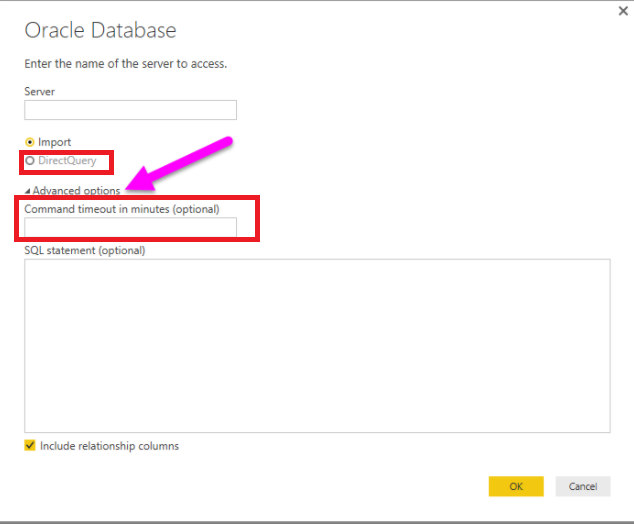
When connecting to Oracle database, choose “DirectQuery” mode and enter a high value in the "Command timeout in minutes (optional)" textbox.
1.PNG

In addition, you can review the join samples in this article: https://www.techonthenet.com/oracle/joins.php .

Regards,

Helpful resources

Announcements
Join our Fabric User Panel

Join our Fabric User Panel

Share feedback directly with Fabric product managers, participate in targeted research studies and influence the Fabric roadmap.

February Power BI Update Carousel

Power BI Monthly Update - February 2026

Check out the February 2026 Power BI update to learn about new features.

FabCon Atlanta 2026 carousel

FabCon Atlanta 2026

Join us at FabCon Atlanta, March 16-20, for the ultimate Fabric, Power BI, AI and SQL community-led event. Save $200 with code FABCOMM.