Don't miss your chance to take the Fabric Data Engineer (DP-600) exam for FREE! Find out how by watching the DP-600 session on-demand now through April 28th.
Learn moreJoin the FabCon + SQLCon recap series. Up next: Power BI, Real-Time Intelligence, IQ and AI, and Data Factory take center stage. All sessions are available on-demand after the live show. Register now
Hi, I am new to Power BI and I am trying to connect to a Oracle database which has a very huge data in it. I am using ODBC option to connect. I have created a DSN and using the same in ODBC. Once I select the DSN and select OK, I receive an error message saying - "Array Dimensions Exceeded Supported Range". Please help me. Thanks.
@cslarun,
Why not directly use the built-in Oracle connector and DirectQuery mode in Power BI Desktop to connect to your database?
Regards,
Lydia
Hi Lydia,
Thanks for replying. I also downloaded the below mentioned Oracle db access client using the below link and tried connecting to the oracle database.
But I receive the following mentioned error -"Details: "Oracle: ORA-12170: TNS:Connect timeout occurred".
Please help me in direct query. How do we query directly and any sample query with join statements.
Thanks,
Arun
@cslarun,
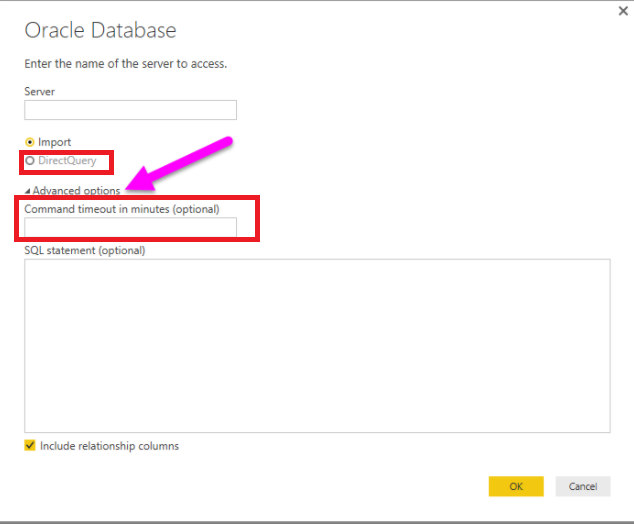
When connecting to Oracle database, choose “DirectQuery” mode and enter a high value in the "Command timeout in minutes (optional)" textbox.
In addition, you can review the join samples in this article: https://www.techonthenet.com/oracle/joins.php .
Regards,
Check out the April 2026 Power BI update to learn about new features.
If you have recently started exploring Fabric, we'd love to hear how it's going. Your feedback can help with product improvements.
A new Power BI DataViz World Championship is coming this June! Don't miss out on submitting your entry.
| User | Count |
|---|---|
| 45 | |
| 38 | |
| 34 | |
| 21 | |
| 17 |
| User | Count |
|---|---|
| 66 | |
| 64 | |
| 31 | |
| 26 | |
| 26 |