Join us at FabCon Atlanta from March 16 - 20, 2026, for the ultimate Fabric, Power BI, AI and SQL community-led event. Save $200 with code FABCOMM.
Register now!The Power BI Data Visualization World Championships is back! Get ahead of the game and start preparing now! Learn more
Hi, I am new to Power BI and I am trying to connect to a Oracle database which has a very huge data in it. I am using ODBC option to connect. I have created a DSN and using the same in ODBC. Once I select the DSN and select OK, I receive an error message saying - "Array Dimensions Exceeded Supported Range". Please help me. Thanks.
@cslarun,
Why not directly use the built-in Oracle connector and DirectQuery mode in Power BI Desktop to connect to your database?
Regards,
Lydia
Hi Lydia,
Thanks for replying. I also downloaded the below mentioned Oracle db access client using the below link and tried connecting to the oracle database.
But I receive the following mentioned error -"Details: "Oracle: ORA-12170: TNS:Connect timeout occurred".
Please help me in direct query. How do we query directly and any sample query with join statements.
Thanks,
Arun
@cslarun,
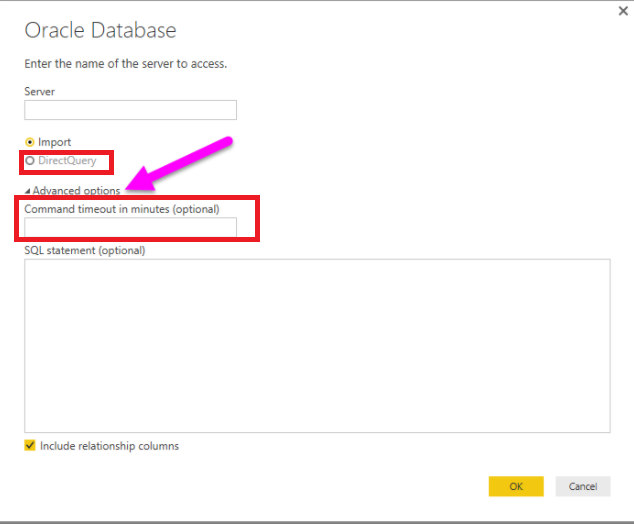
When connecting to Oracle database, choose “DirectQuery” mode and enter a high value in the "Command timeout in minutes (optional)" textbox.
In addition, you can review the join samples in this article: https://www.techonthenet.com/oracle/joins.php .
Regards,
The Power BI Data Visualization World Championships is back! Get ahead of the game and start preparing now!
| User | Count |
|---|---|
| 39 | |
| 39 | |
| 37 | |
| 29 | |
| 24 |
| User | Count |
|---|---|
| 120 | |
| 95 | |
| 70 | |
| 69 | |
| 65 |