This is best Fabric, Power BI, SQL and AI community event. How do we know? The last event sold out! Save €200 with code FABCMTY200.
Register nowA new Data Days event is coming soon! This time we’re going bigger than ever. Fabric, Power BI, SQL, AI and more. Don't miss out.
I'm currently building a report based on a Cube built by a different team. This means I cannot create custom columns or add additional datasets. I am limited to using Measures, Bookmarks, and Visual-Page-Report level filters.
I have the need to filter on multiple "contains" strings for 1 column. Similar to this question:
Is there any way to do this without creating custom calculated columns?
Solved! Go to Solution.
Hi @MAPM
Please refer to sample file with the proposed solution https://www.dropbox.com/t/Nd2LhJFlC0H1ZlwJ
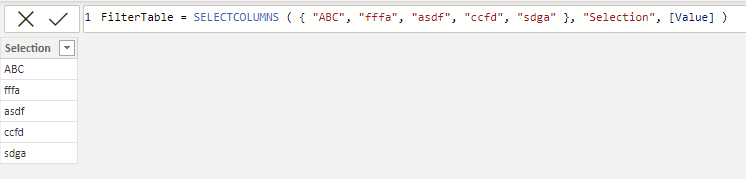
This requires creating a filter table with the desired strings. Can be created with code if you give more details. For now I created with hard code.
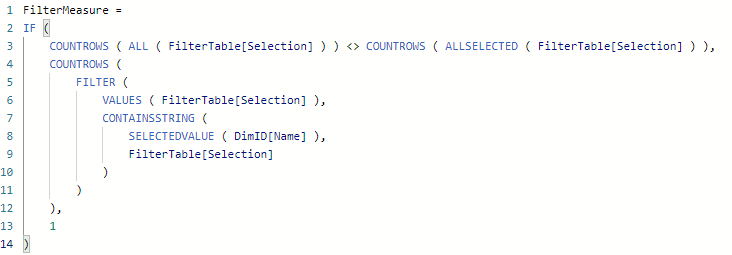
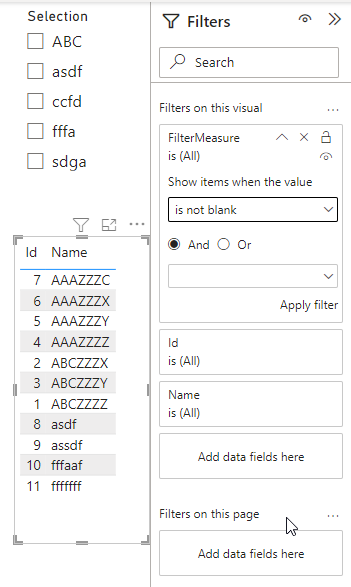
Then create the filter measure, place it in the filter pane, select "Is not blank" and apply the filter.
FilterMeasure =
IF (
COUNTROWS ( ALL ( FilterTable[Selection] ) ) <> COUNTROWS ( ALLSELECTED ( FilterTable[Selection] ) ),
COUNTROWS (
FILTER (
VALUES ( FilterTable[Selection] ),
CONTAINSSTRING (
SELECTEDVALUE ( DimID[Name] ),
FilterTable[Selection]
)
)
),
1
)
Hi @MAPM
Please refer to sample file with the proposed solution https://www.dropbox.com/t/Nd2LhJFlC0H1ZlwJ
This requires creating a filter table with the desired strings. Can be created with code if you give more details. For now I created with hard code.
Then create the filter measure, place it in the filter pane, select "Is not blank" and apply the filter.
FilterMeasure =
IF (
COUNTROWS ( ALL ( FilterTable[Selection] ) ) <> COUNTROWS ( ALLSELECTED ( FilterTable[Selection] ) ),
COUNTROWS (
FILTER (
VALUES ( FilterTable[Selection] ),
CONTAINSSTRING (
SELECTEDVALUE ( DimID[Name] ),
FilterTable[Selection]
)
)
),
1
)
To add some additional context. The closest I've gotten to what I need is by creating a measure like this:
ContainsRelevantStrings =
CALCULATE (
IF(COUNTROWS ( t1 )>0,1,0),
FILTER (
t1 ,
CONTAINSSTRING ( t1[Name], "ABC" ) = TRUE ()
|| CONTAINSSTRING ( t1[Name], "fffa" ) = TRUE ()
|| CONTAINSSTRING ( t1[Name], "asdf" ) = TRUE ()
)
)Putting that measure as a Visual Filter on a slicer with the DimensionTable[Name] and setting that Measure Visual Filter to = 1.
This gives me a slicer with all the relevant Dimension Names. The problem is that if I click "Select All" on that Slicer it still selects ALL the Dimension[Name] rows.
This seems to be an issue other people are running into too:
Hi @MAPM
Yes possible. Would you please provide some sample data along with the expected result?
It's very similar to the question I linked to, but to provide an example.
I have a dimension table with 1000s of rows, for example:
| Id | Name |
| 1 | ABCZZZZ |
| 2 | ABCZZZX |
| 3 | ABCZZZY |
| 4 | AAAZZZZ |
| 5 | AAAZZZY |
| 6 | AAAZZZX |
| 7 | AAAZZZC |
| 8 | asdf |
| 9 | assdf |
| 10 | fffaaf |
| 11 | fffffff |
This Dimension table links to several metric tables.
I am trying to filter the full report based on filtering this dimension "Name" column, using a contains of several strings (give or take 12 strings).
To simplify & using the example above. Imagine I'd like to filter the Dimension table for any string that contains:
"ABC", "fffa", "asdf"
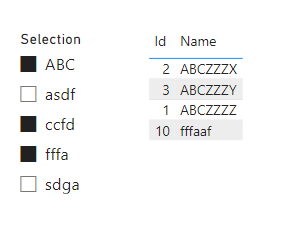
I would expect the corresponding Dimension table to then filter to:
| Id | Name |
| 1 | ABCZZZZ |
| 2 | ABCZZZX |
| 3 | ABCZZZY |
| 8 | asdf |
| 10 | fffaaf |
Which would in turn filter my metric tables.
Normally I'd create a Calculated column that would help me achieve this, but that's not an option for my current setup (because I'm reporting using a Cube that is owned and maintained by another team).
Check out the May 2026 Power BI update to learn about new features.
Sign up to receive a private message when registration opens and key events begin.
If you have recently started exploring Fabric, we'd love to hear how it's going. Your feedback can help with product improvements.
| User | Count |
|---|---|
| 27 | |
| 26 | |
| 25 | |
| 21 | |
| 14 |
| User | Count |
|---|---|
| 52 | |
| 46 | |
| 23 | |
| 18 | |
| 18 |