cancel
Showing results for 
Search instead for 
Did you mean: 

July 7 - July 17 | Round 2 of the Power BI Dataviz World Championships. Don't miss your chance! Learn more

Reply
Anonymous
Not applicable

Missing data after refresh

Hi there. Why would certain data (always only from two columns) disappear in the reports after refreshing it in PowerBI service. After uploading pbix files from OneDrive (tried Teams as well) and configuring gateway, the data is there and the reports look like they should. Once I refresh it manually or via scheduled refresh the data is gone and it never reappears. 

1 ACCEPTED SOLUTION
Anonymous
Not applicable

Problem solved. Turns out an account that was used to access the database and configure gateway didn't have full access to this database. So I changed it to my personal account and it worked. 

View solution in original post

5 REPLIES 5
Anonymous
Not applicable

Problem solved. Turns out an account that was used to access the database and configure gateway didn't have full access to this database. So I changed it to my personal account and it worked. 

Anonymous
Not applicable

@Anonymous 
Where is your datasources? I see you have pbix in onedrive, does the data source file also there?. If the data sources is online for example onedrive, you do not need a gateway to refresh. 


For the issue, I wonder what do you mean by data disappear, the data form datasource didn't refresh to the dataset on service or just the value is hidden in the report visual?


Regards

Paul Zheng _ Community Support Team


Anonymous
Not applicable

Hi @Anonymous it's an sql db. I suspect it could be due to a service account (not my personal account) used for setting up the gateway. 

I say disappear because once the reporst are refreshed, this data is not displayed anymore. And if I downlad this altered pbix to the desktop and open it, this data is still missing in the report.

amitchandak
Super User
Super User

@Anonymous ,

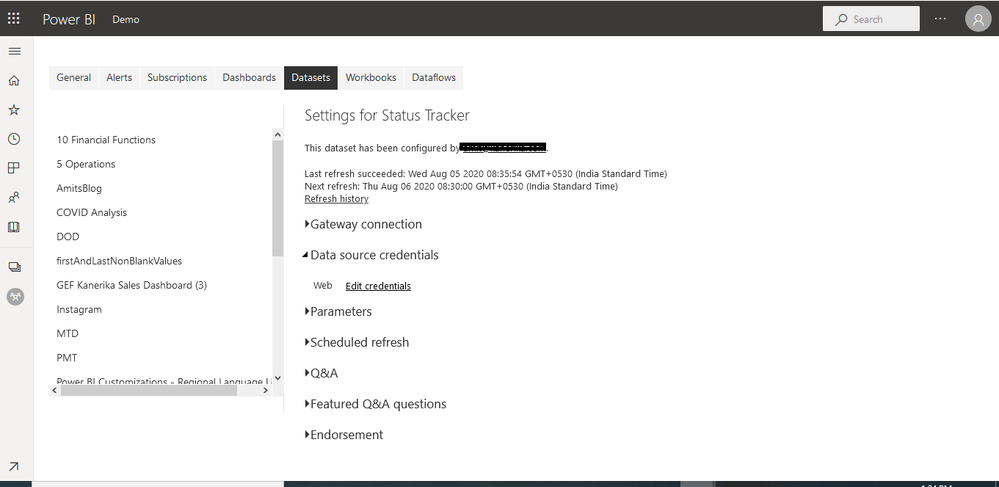
Once you upload open data connection setting in service make sure credentials are correct


Screenshot 2020-08-05 13.24.55.png

https://docs.microsoft.com/en-us/power-bi/connect-data/desktop-use-onedrive-business-links

Share with Power BI Enthusiasts: Full Power BI Video (20 Hours) YouTube
Microsoft Fabric Series 60+ Videos YouTube
Microsoft Fabric Hindi End to End YouTube
Anonymous
Not applicable

Hi @amitchandak thanks! Credentials for all sources seem ok.

Capture.PNG

Helpful resources

Announcements
FabCon and SQLCon Barcelona 2026

FabCon & SQLCon – Barcelona 2026

Join us in Barcelona for FabCon and SQLCon, the Fabric, Power BI, SQL, and AI community event. Save €200 with code FABCMTY200.

60 days of Data Days Carousel

Data Days 2026

Join Fabric Data Days 2026: 60 days of free live/on-demand sessions, challenges, study groups, and certification opportunities.

Power BI DataViz World Championships carousel

Power BI DataViz World Championships - June 2026

A new Power BI DataViz World Championship is coming this June! Don't miss out on submitting your entry.