Don't miss your chance to take the Fabric Data Engineer (DP-600) exam for FREE! Find out how by attending the DP-600 session on April 23rd (pacific time), live or on-demand.
Learn moreNext up in the FabCon + SQLCon recap series: The roadmap for Microsoft SQL and Maximizing Developer experiences in Fabric. All sessions are available on-demand after the live show. Register now
Hi there. Why would certain data (always only from two columns) disappear in the reports after refreshing it in PowerBI service. After uploading pbix files from OneDrive (tried Teams as well) and configuring gateway, the data is there and the reports look like they should. Once I refresh it manually or via scheduled refresh the data is gone and it never reappears.
Solved! Go to Solution.
Problem solved. Turns out an account that was used to access the database and configure gateway didn't have full access to this database. So I changed it to my personal account and it worked.
@Anonymous
Where is your datasources? I see you have pbix in onedrive, does the data source file also there?. If the data sources is online for example onedrive, you do not need a gateway to refresh.
For the issue, I wonder what do you mean by data disappear, the data form datasource didn't refresh to the dataset on service or just the value is hidden in the report visual?
Regards
Paul Zheng _ Community Support Team
Hi @Anonymous it's an sql db. I suspect it could be due to a service account (not my personal account) used for setting up the gateway.
I say disappear because once the reporst are refreshed, this data is not displayed anymore. And if I downlad this altered pbix to the desktop and open it, this data is still missing in the report.
@Anonymous ,
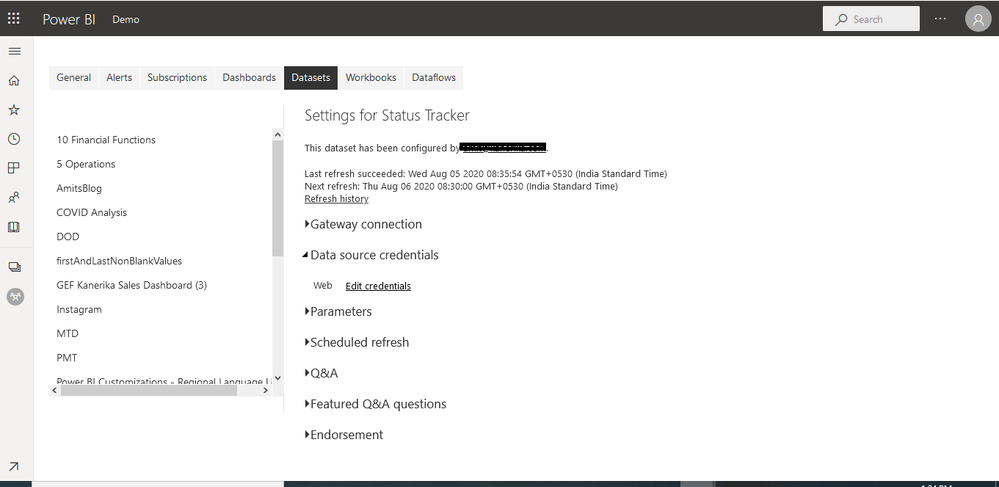
Once you upload open data connection setting in service make sure credentials are correct
https://docs.microsoft.com/en-us/power-bi/connect-data/desktop-use-onedrive-business-links
If you have recently started exploring Fabric, we'd love to hear how it's going. Your feedback can help with product improvements.
A new Power BI DataViz World Championship is coming this June! Don't miss out on submitting your entry.
| User | Count |
|---|---|
| 44 | |
| 43 | |
| 38 | |
| 19 | |
| 15 |
| User | Count |
|---|---|
| 68 | |
| 66 | |
| 31 | |
| 28 | |
| 24 |