Join us at FabCon Atlanta from March 16 - 20, 2026, for the ultimate Fabric, Power BI, AI and SQL community-led event. Save $200 with code FABCOMM.
Register now!Get Fabric certified for FREE! Don't miss your chance! Learn more
Hello,
How can we show the metadata associated with the files uploaded in a SharePoint document library in a Power BI report. While connecting to the Doc library from Power BI none of these fiels - including Author and Editor is available in the Power BI. How can we pull these information to report?
Thanks in advance,
Sreeja
Solved! Go to Solution.
Hi @sreejavg,
You can use OData feed connector in Power BI desktop then type below URL , choose Documents table:
https://<yoursharepointsite>/_vti_bin/listdata.svc
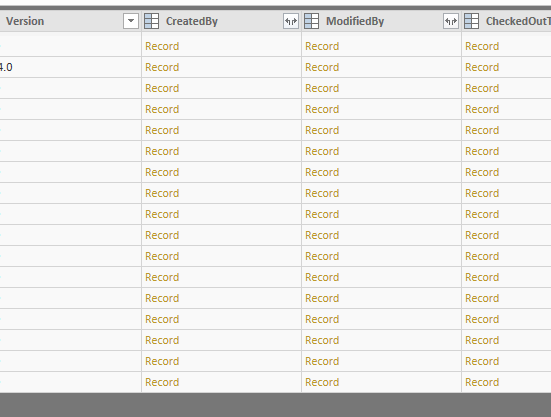
In Query Editor, you can expand CreatedBy and Modified By columns to see author and editor information.
Best Regards,
Qiuyun Yu
Hi @sreejavg,
You can use OData feed connector in Power BI desktop then type below URL , choose Documents table:
https://<yoursharepointsite>/_vti_bin/listdata.svc
In Query Editor, you can expand CreatedBy and Modified By columns to see author and editor information.
Best Regards,
Qiuyun Yu
Hello @v-qiuyu-msft ,
In relation to the post - Metadata from SharePoint documetnt Library
This is what I am looking for, the only thing for me is that I have subsites, that I want to get the missing metadata from the libraries, is there away to connect to the subsite locations without having to enter each url address for each site, as I have around 100 sites.
I am trying to police missing metadata.
Any suggestions?
Thank you
Claire
Hi,
I have the same issue, did you manage to find out the way to do it or a workaround?
Share feedback directly with Fabric product managers, participate in targeted research studies and influence the Fabric roadmap.
Check out the January 2026 Power BI update to learn about new features.
| User | Count |
|---|---|
| 68 | |
| 59 | |
| 44 | |
| 20 | |
| 15 |
| User | Count |
|---|---|
| 104 | |
| 102 | |
| 37 | |
| 26 | |
| 26 |