Share feedback directly with Fabric product managers, participate in targeted research studies and influence the Fabric roadmap.
Sign up nowGet Fabric certified for FREE! Don't miss your chance! Learn more
Hello,
How can we show the metadata associated with the files uploaded in a SharePoint document library in a Power BI report. While connecting to the Doc library from Power BI none of these fiels - including Author and Editor is available in the Power BI. How can we pull these information to report?
Thanks in advance,
Sreeja
Solved! Go to Solution.
Hi @sreejavg,
You can use OData feed connector in Power BI desktop then type below URL , choose Documents table:
https://<yoursharepointsite>/_vti_bin/listdata.svc
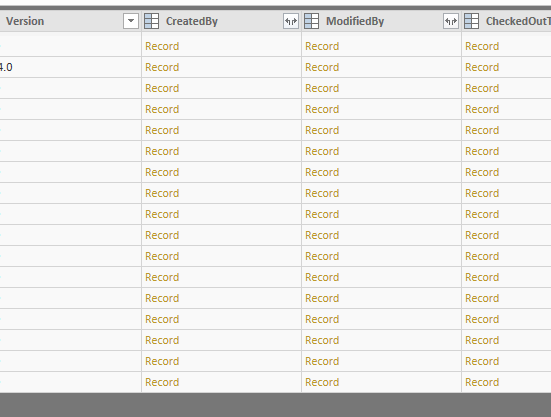
In Query Editor, you can expand CreatedBy and Modified By columns to see author and editor information.
Best Regards,
Qiuyun Yu
Hi @sreejavg,
You can use OData feed connector in Power BI desktop then type below URL , choose Documents table:
https://<yoursharepointsite>/_vti_bin/listdata.svc
In Query Editor, you can expand CreatedBy and Modified By columns to see author and editor information.
Best Regards,
Qiuyun Yu
Hello @v-qiuyu-msft ,
In relation to the post - Metadata from SharePoint documetnt Library
This is what I am looking for, the only thing for me is that I have subsites, that I want to get the missing metadata from the libraries, is there away to connect to the subsite locations without having to enter each url address for each site, as I have around 100 sites.
I am trying to police missing metadata.
Any suggestions?
Thank you
Claire
Hi,
I have the same issue, did you manage to find out the way to do it or a workaround?
If you love stickers, then you will definitely want to check out our Community Sticker Challenge!
Check out the January 2026 Power BI update to learn about new features.
| User | Count |
|---|---|
| 61 | |
| 58 | |
| 45 | |
| 21 | |
| 18 |
| User | Count |
|---|---|
| 121 | |
| 116 | |
| 37 | |
| 35 | |
| 30 |