This is best Fabric, Power BI, SQL and AI community event. How do we know? The last event sold out! Save €200 with code FABCMTY200.
Register nowThe Fabric community is upgrading! Read all of the details including the timeline and what you can expect. Learn more
Hi, i am trying to create a measure to pupulate a teable but am struggling.
I have a quite comlicated datase, but have shown a simplified version below.
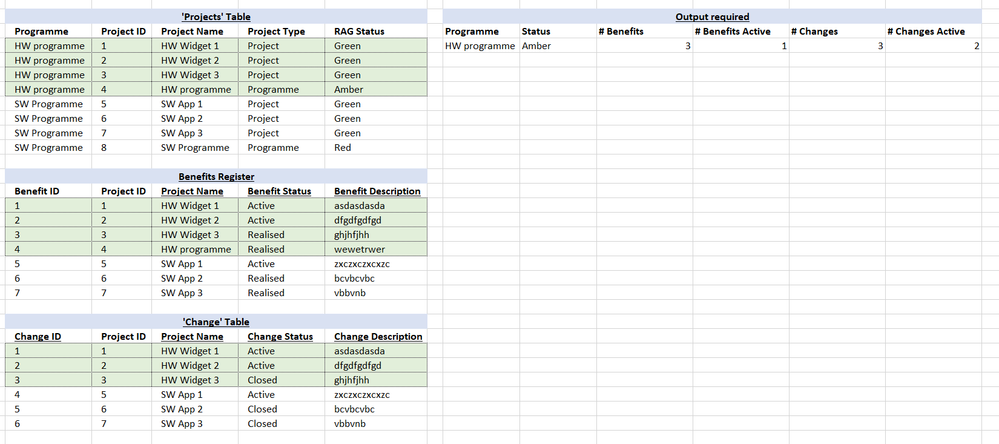
Projects Table
This contains a list of projects and programmes. each project and programme is assigned to a programme.
Change and Benefits Registers
These are sharepoint lists that users can capture records against projects or programmes. They are joined to the projects table by the Project ID.
Output needed
I am trying to create a 'programme report'. There will be a slicer where the user selects 'Programme' from the unique values in the 'Projects[Programme].
I want to create a table that shows the
- count of changes
- count of changes open
- count of benefits
- count of benefits open
Any suggestions?
PS, summary of the schema below
Hi @Anonymous
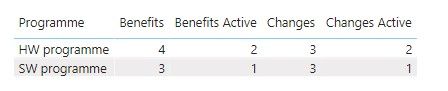
You can create measures like below. Download the PBIX file for details.
Benefits = COUNT('Benefits Register'[Project ID])
Benefits Active = COUNTX(FILTER('Benefits Register','Benefits Register'[Benefit Status]="Active"),'Benefits Register'[Project ID])
Changes = COUNT('Change'[Project ID])
Changes Active = COUNTX(FILTER('Change','Change'[Change Status]="Active"),'Change'[Project ID])
Kindly let me know if this helps.
Community Support Team _ Jing
If this post helps, please Accept it as the solution to help other members find it.
@Anonymous
Any chance you can share the actual sample data, as opposed to an image?
Proud to be a Super User!
Paul on Linkedin.
Hi Paul, unoftunately i cant as it Microsoft Project Online data that we access through an api and also includes a lot of sensitive information, hence my representation in excel.
Join us in Barcelona for FabCon and SQLCon, the Fabric, Power BI, SQL, and AI community event. Save €200 with code FABCMTY200.
| User | Count |
|---|---|
| 24 | |
| 22 | |
| 20 | |
| 18 | |
| 14 |
| User | Count |
|---|---|
| 32 | |
| 26 | |
| 23 | |
| 20 | |
| 20 |