cancel
Showing results for 
Search instead for 
Did you mean: 

The Power BI Data Visualization World Championships is back! Get ahead of the game and start preparing now! Learn more

Reply
Anonymous
Not applicable

Measure Question

Hi, i am trying to create a measure to pupulate a teable but am struggling.

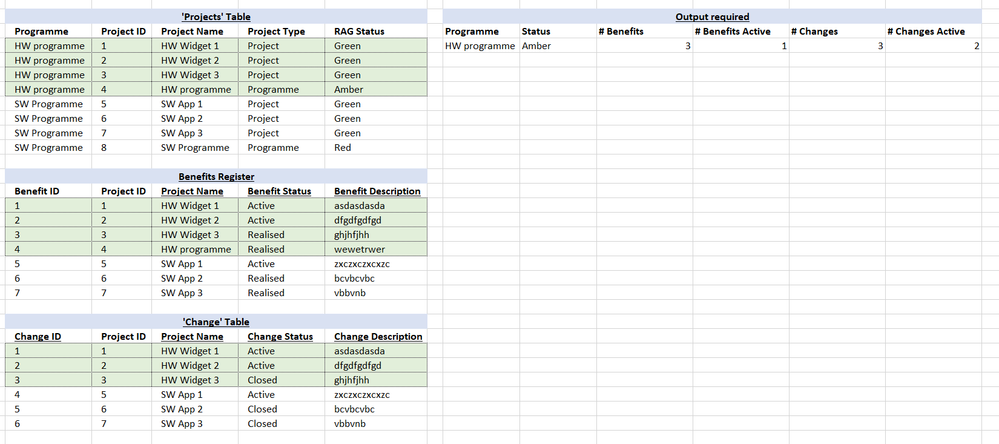
I have a quite comlicated datase, but have shown a simplified version below.


Projects Table

This contains a list of projects and programmes. each project and programme is assigned to a programme.


Change and Benefits Registers

These are sharepoint lists that users can capture records against projects or programmes. They are joined to the projects table by the Project ID.


Output needed

I am trying to create a 'programme report'. There will be  a slicer where the user selects 'Programme' from the unique values in the 'Projects[Programme].

I want to create a table that shows the

- count of changes

- count of changes open

- count of benefits

- count of benefits open


Any suggestions?


PS, summary of the schema below 


Screenshot 2021-02-26 101143.png

3 REPLIES 3
v-jingzhang
Community Support
Community Support

Hi @Anonymous 

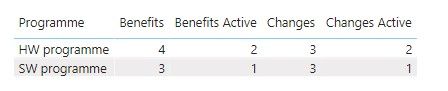
You can create measures like below. Download the PBIX file for details.

Benefits = COUNT('Benefits Register'[Project ID])

Benefits Active = COUNTX(FILTER('Benefits Register','Benefits Register'[Benefit Status]="Active"),'Benefits Register'[Project ID])

Changes = COUNT('Change'[Project ID])

Changes Active = COUNTX(FILTER('Change','Change'[Change Status]="Active"),'Change'[Project ID])

 030203.jpg

Kindly let me know if this helps.
Community Support Team _ Jing
If this post helps, please Accept it as the solution to help other members find it.

PaulDBrown
Community Champion
Community Champion

@Anonymous 

Any chance you can share the actual sample data, as opposed to an image?


Did I answer your question? Mark my post as a solution!
In doing so, you are also helping me. Thank you!

Proud to be a Super User!
Paul on Linkedin.


Anonymous
Not applicable

Hi Paul, unoftunately i cant as it Microsoft Project Online data that we access through an api and also includes a lot of sensitive information, hence my representation in excel.

Helpful resources

Announcements
Power BI DataViz World Championships

Power BI Dataviz World Championships

The Power BI Data Visualization World Championships is back! Get ahead of the game and start preparing now!

December 2025 Power BI Update Carousel

Power BI Monthly Update - December 2025

Check out the December 2025 Power BI Holiday Recap!

FabCon Atlanta 2026 carousel

FabCon Atlanta 2026

Join us at FabCon Atlanta, March 16-20, for the ultimate Fabric, Power BI, AI and SQL community-led event. Save $200 with code FABCOMM.