This is best Fabric, Power BI, SQL and AI community event. How do we know? The last event sold out! Save €200 with code FABCMTY200.
Register nowJuly 28 - August 9 | Final Round of the Power BI Dataviz World Championships. This is your chance. Learn more
Hi community,
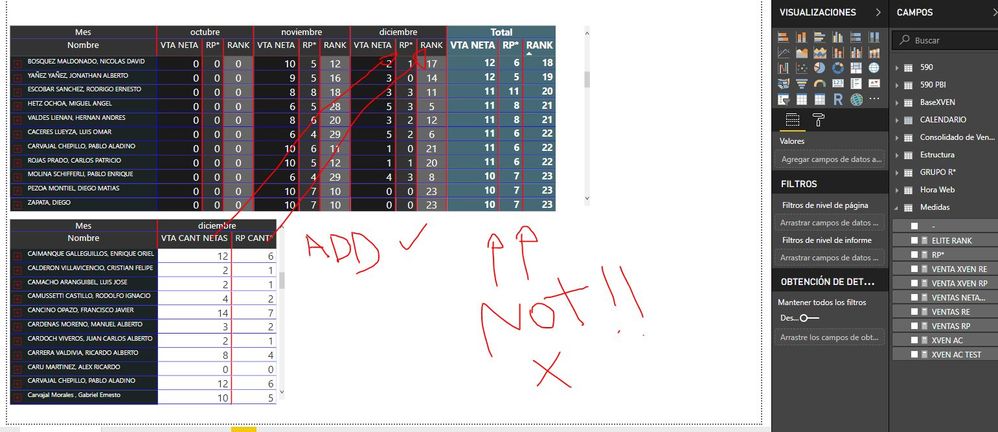
I have a question that Im affraid is not possible to be answered unless someone mega PRO. (crossing fingers)
I need to add 2 columns in my Matrix only for december and not to be in the total.
Anybody has an Idea how I could possibly solve something like this at least close to a solution?
Solved! Go to Solution.
HI, @Anonymous
You may try this simple way as below:
Step1:
Select matrix visual then Format->Column headers->Word wrap, disable it.
Step2:
Add a measure for "two columns" like this
Best Regards,
Lin
HI, @Anonymous
You may try this simple way as below:
Step1:
Select matrix visual then Format->Column headers->Word wrap, disable it.
Step2:
Add a measure for "two columns" like this
Best Regards,
Lin
Hi @Anonymous
If I understand correctly what you need, I think we solved something similar in this post.
Check it out.
Join us in Barcelona for FabCon and SQLCon, the Fabric, Power BI, SQL, and AI community event. Save €200 with code FABCMTY200.
If you love stickers, then you will definitely want to check out our community sticker challenge, Barcelona edition!
Check out the July 2026 Power BI update to learn about new features.
| User | Count |
|---|---|
| 25 | |
| 23 | |
| 22 | |
| 17 | |
| 14 |
| User | Count |
|---|---|
| 25 | |
| 24 | |
| 20 | |
| 19 | |
| 19 |