Join us at FabCon Atlanta from March 16 - 20, 2026, for the ultimate Fabric, Power BI, AI and SQL community-led event. Save $200 with code FABCOMM.
Register now!The Power BI Data Visualization World Championships is back! Get ahead of the game and start preparing now! Learn more
Hi community,
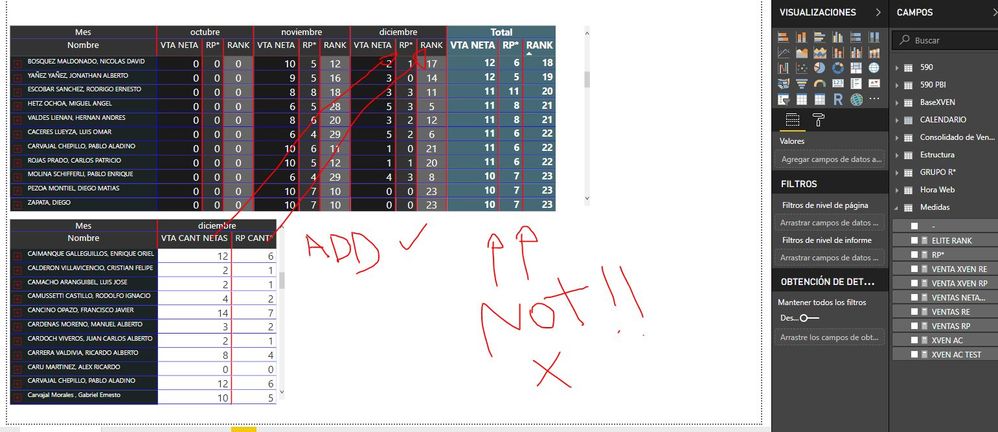
I have a question that Im affraid is not possible to be answered unless someone mega PRO. (crossing fingers)
I need to add 2 columns in my Matrix only for december and not to be in the total.
Anybody has an Idea how I could possibly solve something like this at least close to a solution?
Solved! Go to Solution.
HI, @Anonymous
You may try this simple way as below:
Step1:
Select matrix visual then Format->Column headers->Word wrap, disable it.
Step2:
Add a measure for "two columns" like this
Best Regards,
Lin
HI, @Anonymous
You may try this simple way as below:
Step1:
Select matrix visual then Format->Column headers->Word wrap, disable it.
Step2:
Add a measure for "two columns" like this
Best Regards,
Lin
Hi @Anonymous
If I understand correctly what you need, I think we solved something similar in this post.
Check it out.
The Power BI Data Visualization World Championships is back! Get ahead of the game and start preparing now!
Check out the November 2025 Power BI update to learn about new features.
| User | Count |
|---|---|
| 59 | |
| 43 | |
| 42 | |
| 23 | |
| 17 |
| User | Count |
|---|---|
| 190 | |
| 122 | |
| 96 | |
| 66 | |
| 47 |