This time we’re going bigger than ever. Fabric, Power BI, SQL, AI and more. We're covering it all. You won't want to miss it.
Learn moreDid you hear? There's a new SQL AI Developer certification (DP-800). Start preparing now and be one of the first to get certified. Register now
Hello! I'm a bit new to PowerBI so this might be a dumb question, apologies in advance if my explanation is not the best either.
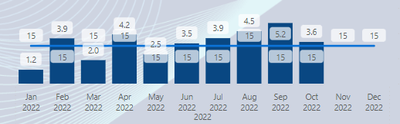
I have a Line and clustered column chart, the columns are showing an average number and the line chart is a static number Measure (15).
I would like the line Y-axis to be in relation to the columns but right now the columns are higher than the line even though their values are less. How would I go about fixing this?
Solved! Go to Solution.
Go to Visual, Secondary y-axis - on. The range is there.
Not getting this to work as expected unfortunately, please see my reply below.
But have you tried the Secondary Y-axis?
Ohhh, I totally missed this, thank you so much!
My pleasure, Jowh!
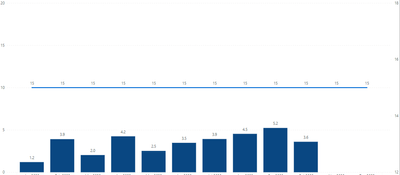
By tampering with min/max values of Y axis I can adjust the placement of the line somewhat but it is still not "aligned" with the bars. Ie in the picture it looks like 5 is 50% to 15:
I understand that this is because the Y and X axis ranges are different (0-20 & 12-18) but I cant find any way of setting the range of the X axis.
Check out the April 2026 Power BI update to learn about new features.
Sign up to receive a private message when registration opens and key events begin.
If you have recently started exploring Fabric, we'd love to hear how it's going. Your feedback can help with product improvements.
| User | Count |
|---|---|
| 34 | |
| 31 | |
| 30 | |
| 21 | |
| 16 |
| User | Count |
|---|---|
| 61 | |
| 50 | |
| 30 | |
| 23 | |
| 23 |