Don't miss your chance to take the Fabric Data Engineer (DP-600) exam for FREE! Find out how by attending the DP-600 session on April 23rd (pacific time), live or on-demand.
Learn moreNext up in the FabCon + SQLCon recap series: The roadmap for Microsoft SQL and Maximizing Developer experiences in Fabric. All sessions are available on-demand after the live show. Register now
Hello! I'm a bit new to PowerBI so this might be a dumb question, apologies in advance if my explanation is not the best either.
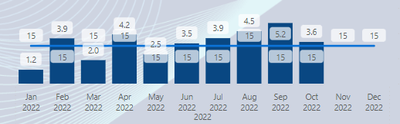
I have a Line and clustered column chart, the columns are showing an average number and the line chart is a static number Measure (15).
I would like the line Y-axis to be in relation to the columns but right now the columns are higher than the line even though their values are less. How would I go about fixing this?
Solved! Go to Solution.
Go to Visual, Secondary y-axis - on. The range is there.
Not getting this to work as expected unfortunately, please see my reply below.
But have you tried the Secondary Y-axis?
Ohhh, I totally missed this, thank you so much!
My pleasure, Jowh!
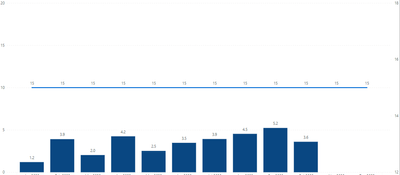
By tampering with min/max values of Y axis I can adjust the placement of the line somewhat but it is still not "aligned" with the bars. Ie in the picture it looks like 5 is 50% to 15:
I understand that this is because the Y and X axis ranges are different (0-20 & 12-18) but I cant find any way of setting the range of the X axis.
If you have recently started exploring Fabric, we'd love to hear how it's going. Your feedback can help with product improvements.
A new Power BI DataViz World Championship is coming this June! Don't miss out on submitting your entry.
| User | Count |
|---|---|
| 45 | |
| 43 | |
| 39 | |
| 19 | |
| 15 |
| User | Count |
|---|---|
| 68 | |
| 65 | |
| 31 | |
| 28 | |
| 24 |