This time we’re going bigger than ever. Fabric, Power BI, SQL, AI and more. We're covering it all. You won't want to miss it.
Learn moreDid you hear? There's a new SQL AI Developer certification (DP-800). Start preparing now and be one of the first to get certified. Register now
Hello! I'm a bit new to PowerBI so this might be a dumb question, apologies in advance if my explanation is not the best either.
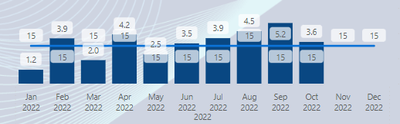
I have a Line and clustered column chart, the columns are showing an average number and the line chart is a static number Measure (15).
I would like the line Y-axis to be in relation to the columns but right now the columns are higher than the line even though their values are less. How would I go about fixing this?
Solved! Go to Solution.
Go to Visual, Secondary y-axis - on. The range is there.
Not getting this to work as expected unfortunately, please see my reply below.
But have you tried the Secondary Y-axis?
Ohhh, I totally missed this, thank you so much!
My pleasure, Jowh!
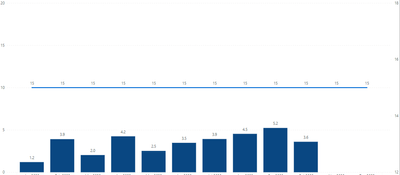
By tampering with min/max values of Y axis I can adjust the placement of the line somewhat but it is still not "aligned" with the bars. Ie in the picture it looks like 5 is 50% to 15:
I understand that this is because the Y and X axis ranges are different (0-20 & 12-18) but I cant find any way of setting the range of the X axis.
Check out the April 2026 Power BI update to learn about new features.
If you have recently started exploring Fabric, we'd love to hear how it's going. Your feedback can help with product improvements.
A new Power BI DataViz World Championship is coming this June! Don't miss out on submitting your entry.
| User | Count |
|---|---|
| 38 | |
| 38 | |
| 31 | |
| 22 | |
| 15 |
| User | Count |
|---|---|
| 74 | |
| 61 | |
| 31 | |
| 31 | |
| 23 |