Learn from the best! Meet the four finalists headed to the FINALS of the Power BI Dataviz World Championships! Register now
Hi,
I have seen on a few posts there is should be a custom query option on the IBM Netezza connection. Has it been removed? I don't seem to have it and I have installed the latest version.
To use a Netezza Query in PowerBI, you will have to use an ODBC.
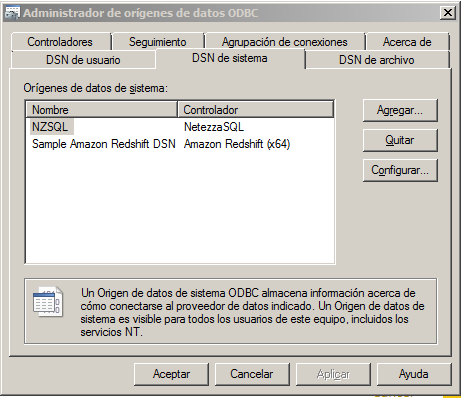
Here is what I do, I installed the Netezza ODBC and setted it up as NTZ.
Then I use the PowerBI to connect to an ODBC, use the advance options and fill the information requerid using the string structure as follow: Driver={NetezzaSQL};servername=myServerAddress;port=myPortNumber;
database=myDataBase
In my case: Driver={NetezzaSQL};servername=130.2.17.200;port=5480;database=STAGE;dsn=NZSQL;
Below the string paste/write the query.
And that is it
To use a Netezza Query in PowerBI, you will have to use an ODBC.
Here is what I do, I installed the Netezza ODBC and setted it up as NTZ. Then I use the PowerBI to connect to an ODBC and fill the information requerid using the string structure as follow: Driver={NetezzaSQL};servername=myServerAddress;port=myPortNumber;
database=myDataBase
In my case: Driver={NetezzaSQL};servername=130.2.17.200;port=5480;database=STAGE;dsn=NZSQL;
Below the string there is an advanced option where you can paste/write the query.
Hi @Tim2369,
It seems there is no custom query option on the IBM Netezza connector with the latest version of Power BI Desktop. If you need this feature, I would suggest you add it as an idea on Power BI Ideas forum to improve Power BI on it. ![]()
Regards
A new Power BI DataViz World Championship is coming this June! Don't miss out on submitting your entry.
Share feedback directly with Fabric product managers, participate in targeted research studies and influence the Fabric roadmap.
| User | Count |
|---|---|
| 45 | |
| 34 | |
| 27 | |
| 15 | |
| 15 |
| User | Count |
|---|---|
| 58 | |
| 56 | |
| 38 | |
| 21 | |
| 21 |