Don't miss your chance to take the Fabric Data Engineer (DP-600) exam for FREE! Find out how by attending the DP-600 session on April 23rd (pacific time), live or on-demand.
Learn moreNext up in the FabCon + SQLCon recap series: The roadmap for Microsoft SQL and Maximizing Developer experiences in Fabric. All sessions are available on-demand after the live show. Register now
Hi,
I have seen on a few posts there is should be a custom query option on the IBM Netezza connection. Has it been removed? I don't seem to have it and I have installed the latest version.
To use a Netezza Query in PowerBI, you will have to use an ODBC.
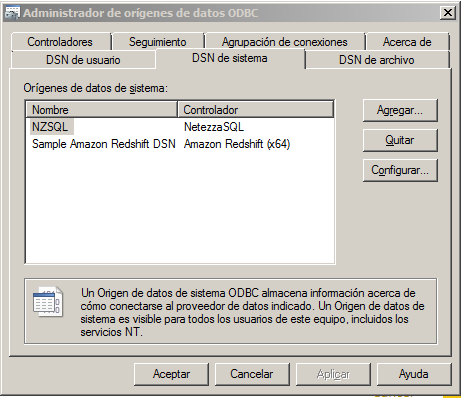
Here is what I do, I installed the Netezza ODBC and setted it up as NTZ.
Then I use the PowerBI to connect to an ODBC, use the advance options and fill the information requerid using the string structure as follow: Driver={NetezzaSQL};servername=myServerAddress;port=myPortNumber;
database=myDataBase
In my case: Driver={NetezzaSQL};servername=130.2.17.200;port=5480;database=STAGE;dsn=NZSQL;
Below the string paste/write the query.
And that is it
To use a Netezza Query in PowerBI, you will have to use an ODBC.
Here is what I do, I installed the Netezza ODBC and setted it up as NTZ. Then I use the PowerBI to connect to an ODBC and fill the information requerid using the string structure as follow: Driver={NetezzaSQL};servername=myServerAddress;port=myPortNumber;
database=myDataBase
In my case: Driver={NetezzaSQL};servername=130.2.17.200;port=5480;database=STAGE;dsn=NZSQL;
Below the string there is an advanced option where you can paste/write the query.
Hi @Tim2369,
It seems there is no custom query option on the IBM Netezza connector with the latest version of Power BI Desktop. If you need this feature, I would suggest you add it as an idea on Power BI Ideas forum to improve Power BI on it. ![]()
Regards
If you have recently started exploring Fabric, we'd love to hear how it's going. Your feedback can help with product improvements.
A new Power BI DataViz World Championship is coming this June! Don't miss out on submitting your entry.
| User | Count |
|---|---|
| 46 | |
| 43 | |
| 39 | |
| 19 | |
| 15 |
| User | Count |
|---|---|
| 68 | |
| 67 | |
| 31 | |
| 27 | |
| 24 |