This is best Fabric, Power BI, SQL and AI community event. How do we know? The last event sold out! Save €200 with code FABCMTY200.
Register nowA new Data Days event is coming soon! This time we’re going bigger than ever. Fabric, Power BI, SQL, AI and more. Don't miss out.
Hi,
I have seen on a few posts there is should be a custom query option on the IBM Netezza connection. Has it been removed? I don't seem to have it and I have installed the latest version.
To use a Netezza Query in PowerBI, you will have to use an ODBC.
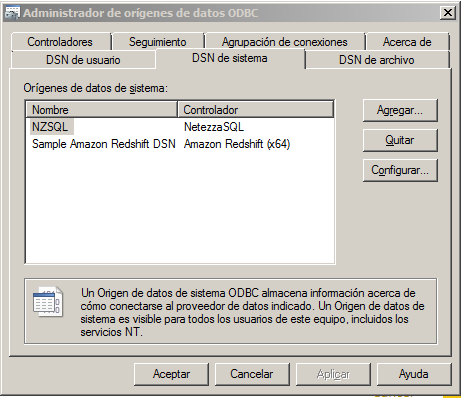
Here is what I do, I installed the Netezza ODBC and setted it up as NTZ.
Then I use the PowerBI to connect to an ODBC, use the advance options and fill the information requerid using the string structure as follow: Driver={NetezzaSQL};servername=myServerAddress;port=myPortNumber;
database=myDataBase
In my case: Driver={NetezzaSQL};servername=130.2.17.200;port=5480;database=STAGE;dsn=NZSQL;
Below the string paste/write the query.
And that is it
To use a Netezza Query in PowerBI, you will have to use an ODBC.
Here is what I do, I installed the Netezza ODBC and setted it up as NTZ. Then I use the PowerBI to connect to an ODBC and fill the information requerid using the string structure as follow: Driver={NetezzaSQL};servername=myServerAddress;port=myPortNumber;
database=myDataBase
In my case: Driver={NetezzaSQL};servername=130.2.17.200;port=5480;database=STAGE;dsn=NZSQL;
Below the string there is an advanced option where you can paste/write the query.
Hi @Tim2369,
It seems there is no custom query option on the IBM Netezza connector with the latest version of Power BI Desktop. If you need this feature, I would suggest you add it as an idea on Power BI Ideas forum to improve Power BI on it. ![]()
Regards
Check out the May 2026 Power BI update to learn about new features.
Sign up to receive a private message when registration opens and key events begin.
If you have recently started exploring Fabric, we'd love to hear how it's going. Your feedback can help with product improvements.
| User | Count |
|---|---|
| 32 | |
| 26 | |
| 23 | |
| 22 | |
| 15 |
| User | Count |
|---|---|
| 63 | |
| 45 | |
| 28 | |
| 24 | |
| 22 |