This is best Fabric, Power BI, SQL and AI community event. How do we know? The last event sold out! Save €200 with code FABCMTY200.
Register nowA new Data Days event is coming soon! This time we’re going bigger than ever. Fabric, Power BI, SQL, AI and more. Don't miss out.
I don't know how to troubleshoot.
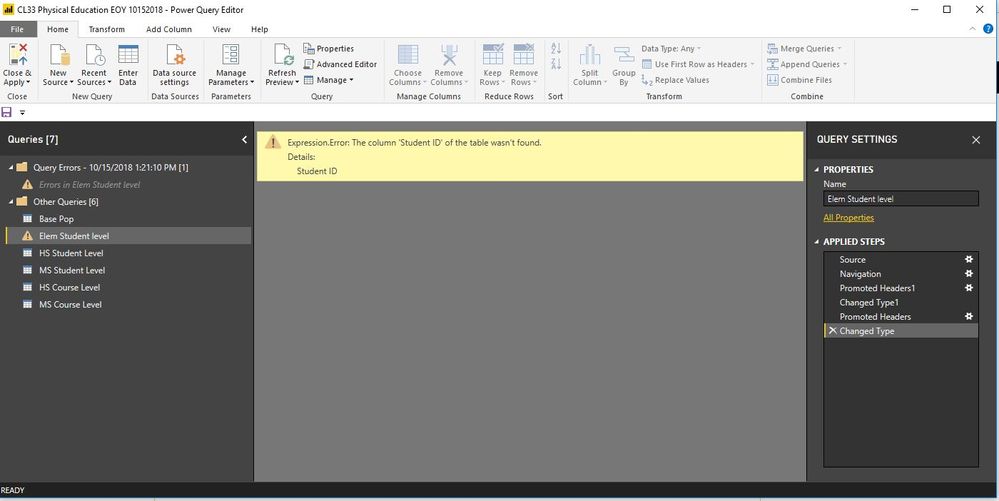
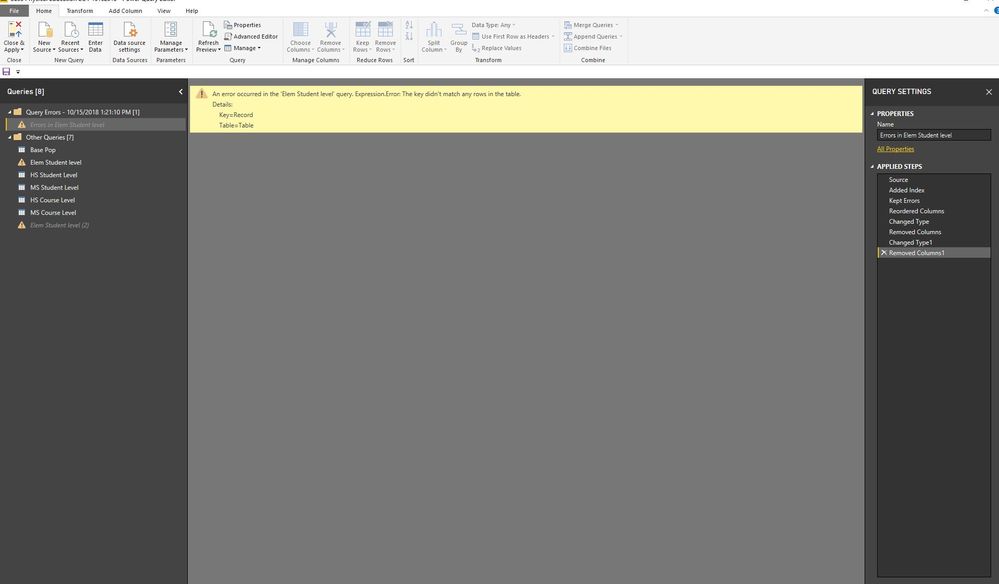
Here is the screenshot of the error.
I don't know why it is not recognizing the Student ID variable. Where should I go to resolve the issue?
Solved! Go to Solution.
Hi @Bbrown44,
Could you please tell me if your problem has been solved? If it is, could you please mark the helpful replies as Answered?
Regards,
Daniel He
Hi @Bbrown44,
Could you please tell me if your problem has been solved? If it is, could you please mark the helpful replies as Answered?
Regards,
Daniel He
@Bbrown44 Please try to navigate through each step perfomed from Query Settings pane on right side. If possible, please post the M-Code available under "Advanced Editor" and sample data as well to replicate your issue.
Proud to be a PBI Community Champion
There are no options in the query settings that would give me the option to change anything.
Hi @Bbrown44,
You could refer to below link that may have the same issue with you:
Regards,
Daniel He
let
Source = Excel.Workbook(File.Contents("K:\Compliance Services\Bryon Brown\My Documents\Data\2017-2018\EndYear\CL33 - Physical Education\Final\CL33 EOY Compliance Report 10172018.xlsx"), null, true),
#"Elem Student level_Sheet" = Source{[Item="Elem Student level",Kind="Sheet"]}[Data],
#"Promoted Headers" = Table.PromoteHeaders(#"Elem Student level_Sheet", [PromoteAllScalars=true]),
#"Changed Type" = Table.TransformColumnTypes(#"Promoted Headers",{{"Student ID", type text}, {"School DBN", type text}, {"Term Model", Int64.Type}, {"First Name", type text}, {"Last Name", type text}, {"Grade Level", type any}, {"Official Class", Int64.Type}, {"School Year", Int64.Type}, {"Term ID", Int64.Type}, {"Scheduling Method", type text}, {"Course Code", type text}, {"Section ID", Int64.Type}, {"Days per week", Int64.Type}, {"Minutes per week", Int64.Type}, {"MTI minutes per week", Int64.Type}, {"Total PE Minutes (corrected)", Int64.Type}, {"Is the school an MTI all-star? (as of 07/20/18)", type any}, {"Does the course meet requirements?", type text}})
in
#"Changed Type"
Sign up to receive a private message when registration opens and key events begin.
If you have recently started exploring Fabric, we'd love to hear how it's going. Your feedback can help with product improvements.
| User | Count |
|---|---|
| 32 | |
| 26 | |
| 21 | |
| 20 | |
| 15 |
| User | Count |
|---|---|
| 65 | |
| 43 | |
| 28 | |
| 22 | |
| 22 |