Get certified for free when you join Fabric Data Days 2026 and dive into Fabric, Power BI, SQL, AI, and other essential data skills.
Join nowData Days is here! Join us now for 60+ days of learning, challenges, and connection. Learn more
I don't know how to troubleshoot.
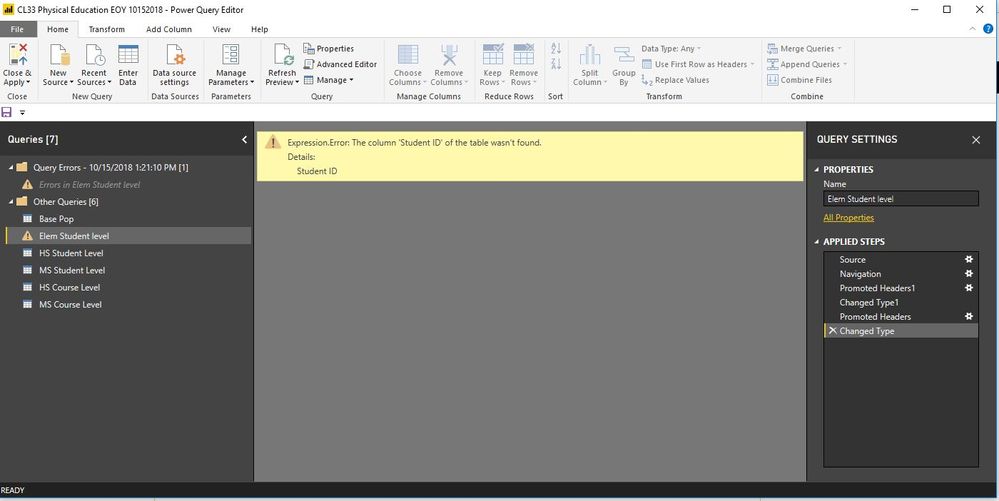
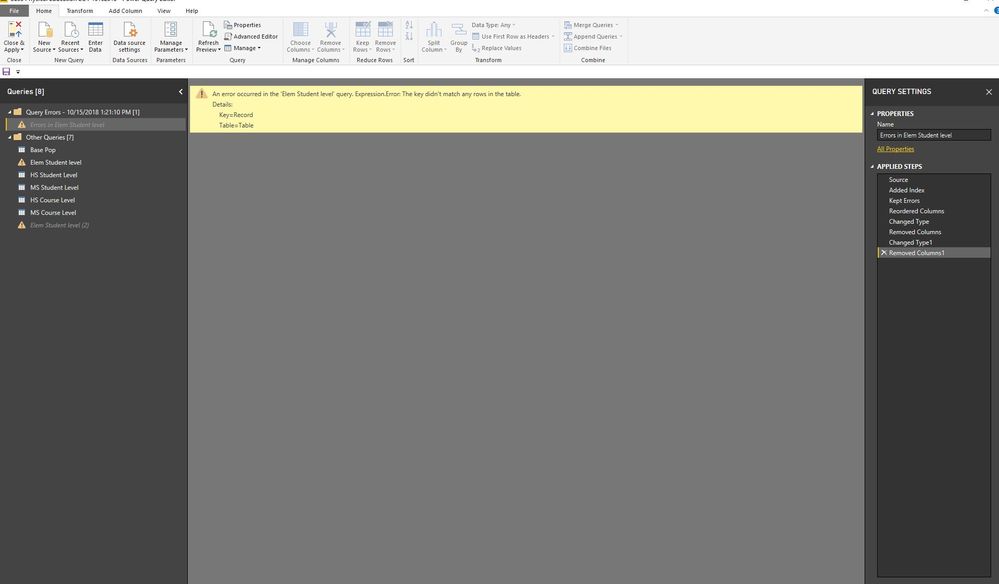
Here is the screenshot of the error.
I don't know why it is not recognizing the Student ID variable. Where should I go to resolve the issue?
Solved! Go to Solution.
Hi @Bbrown44,
Could you please tell me if your problem has been solved? If it is, could you please mark the helpful replies as Answered?
Regards,
Daniel He
Hi @Bbrown44,
Could you please tell me if your problem has been solved? If it is, could you please mark the helpful replies as Answered?
Regards,
Daniel He
@Bbrown44 Please try to navigate through each step perfomed from Query Settings pane on right side. If possible, please post the M-Code available under "Advanced Editor" and sample data as well to replicate your issue.
Proud to be a PBI Community Champion
There are no options in the query settings that would give me the option to change anything.
Hi @Bbrown44,
You could refer to below link that may have the same issue with you:
Regards,
Daniel He
let
Source = Excel.Workbook(File.Contents("K:\Compliance Services\Bryon Brown\My Documents\Data\2017-2018\EndYear\CL33 - Physical Education\Final\CL33 EOY Compliance Report 10172018.xlsx"), null, true),
#"Elem Student level_Sheet" = Source{[Item="Elem Student level",Kind="Sheet"]}[Data],
#"Promoted Headers" = Table.PromoteHeaders(#"Elem Student level_Sheet", [PromoteAllScalars=true]),
#"Changed Type" = Table.TransformColumnTypes(#"Promoted Headers",{{"Student ID", type text}, {"School DBN", type text}, {"Term Model", Int64.Type}, {"First Name", type text}, {"Last Name", type text}, {"Grade Level", type any}, {"Official Class", Int64.Type}, {"School Year", Int64.Type}, {"Term ID", Int64.Type}, {"Scheduling Method", type text}, {"Course Code", type text}, {"Section ID", Int64.Type}, {"Days per week", Int64.Type}, {"Minutes per week", Int64.Type}, {"MTI minutes per week", Int64.Type}, {"Total PE Minutes (corrected)", Int64.Type}, {"Is the school an MTI all-star? (as of 07/20/18)", type any}, {"Does the course meet requirements?", type text}})
in
#"Changed Type"
Don't miss out on Data Days, June 15 through August 7. Learn Fabric, Power BI, SQL, AI and more.
Check out the May 2026 Power BI update to learn about new features.
| User | Count |
|---|---|
| 23 | |
| 23 | |
| 20 | |
| 18 | |
| 14 |
| User | Count |
|---|---|
| 58 | |
| 51 | |
| 40 | |
| 30 | |
| 24 |