Get certified for free when you join Fabric Data Days 2026 and dive into Fabric, Power BI, SQL, AI, and other essential data skills.
Join nowJuly 7 - July 17 | Round 2 of the Power BI Dataviz World Championships. Don't miss your chance! Learn more
I don't know how to troubleshoot.
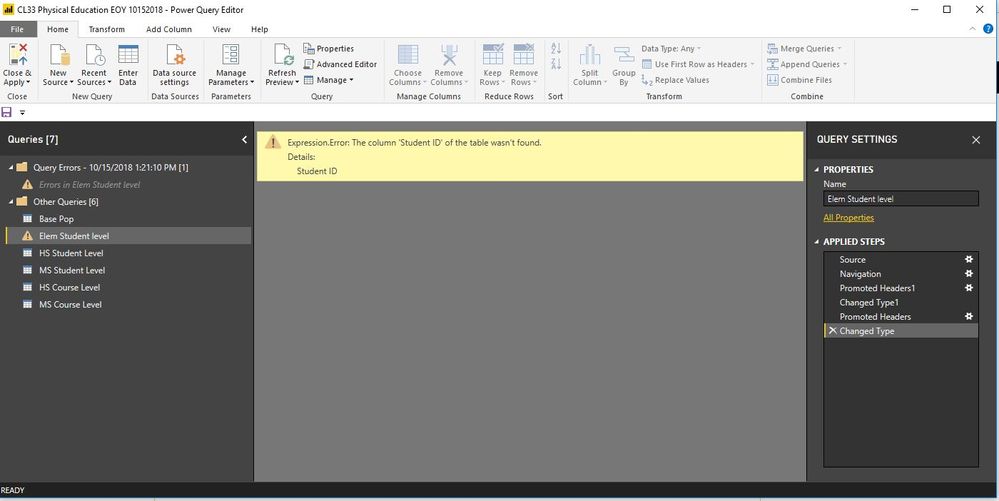
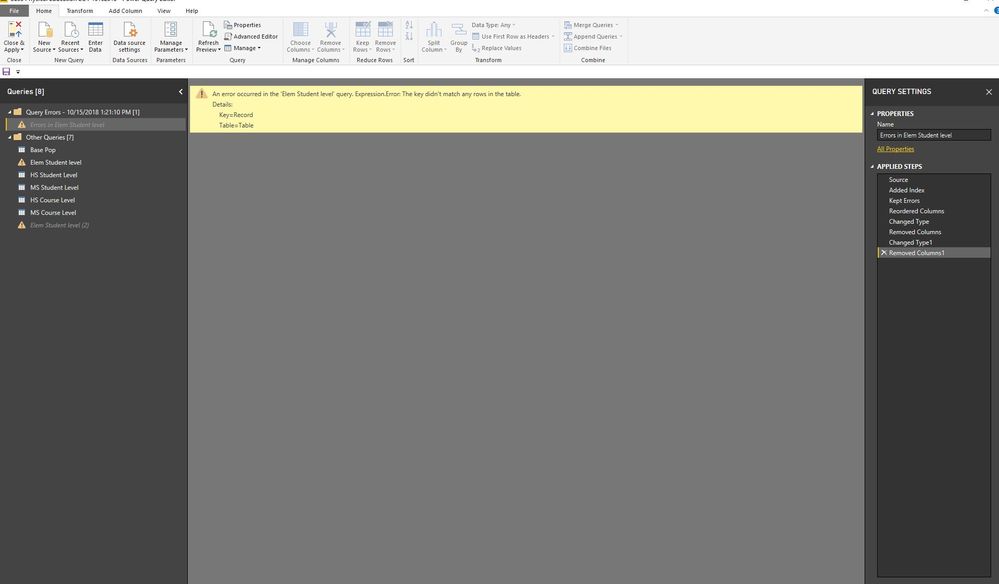
Here is the screenshot of the error.
I don't know why it is not recognizing the Student ID variable. Where should I go to resolve the issue?
Solved! Go to Solution.
Hi @Bbrown44,
Could you please tell me if your problem has been solved? If it is, could you please mark the helpful replies as Answered?
Regards,
Daniel He
Hi @Bbrown44,
Could you please tell me if your problem has been solved? If it is, could you please mark the helpful replies as Answered?
Regards,
Daniel He
@Bbrown44 Please try to navigate through each step perfomed from Query Settings pane on right side. If possible, please post the M-Code available under "Advanced Editor" and sample data as well to replicate your issue.
Proud to be a PBI Community Champion
There are no options in the query settings that would give me the option to change anything.
Hi @Bbrown44,
You could refer to below link that may have the same issue with you:
Regards,
Daniel He
let
Source = Excel.Workbook(File.Contents("K:\Compliance Services\Bryon Brown\My Documents\Data\2017-2018\EndYear\CL33 - Physical Education\Final\CL33 EOY Compliance Report 10172018.xlsx"), null, true),
#"Elem Student level_Sheet" = Source{[Item="Elem Student level",Kind="Sheet"]}[Data],
#"Promoted Headers" = Table.PromoteHeaders(#"Elem Student level_Sheet", [PromoteAllScalars=true]),
#"Changed Type" = Table.TransformColumnTypes(#"Promoted Headers",{{"Student ID", type text}, {"School DBN", type text}, {"Term Model", Int64.Type}, {"First Name", type text}, {"Last Name", type text}, {"Grade Level", type any}, {"Official Class", Int64.Type}, {"School Year", Int64.Type}, {"Term ID", Int64.Type}, {"Scheduling Method", type text}, {"Course Code", type text}, {"Section ID", Int64.Type}, {"Days per week", Int64.Type}, {"Minutes per week", Int64.Type}, {"MTI minutes per week", Int64.Type}, {"Total PE Minutes (corrected)", Int64.Type}, {"Is the school an MTI all-star? (as of 07/20/18)", type any}, {"Does the course meet requirements?", type text}})
in
#"Changed Type"
Join us in Barcelona for FabCon and SQLCon, the Fabric, Power BI, SQL, and AI community event. Save €200 with code FABCMTY200.
Join Data Days 2026: 60 days of free live/on-demand sessions, challenges, study groups, and certification opportunities.
| User | Count |
|---|---|
| 29 | |
| 27 | |
| 25 | |
| 22 | |
| 18 |
| User | Count |
|---|---|
| 52 | |
| 47 | |
| 43 | |
| 36 | |
| 33 |