
This is best Fabric, Power BI, SQL and AI community event. How do we know? The last event sold out! Save €200 with code FABCMTY200.
Register nowThe Fabric community is upgrading! Read all of the details including the timeline and what you can expect. Learn more
Hello Power BI Community,
I have an issue with merging columns together in "edit query" mode.
If you could help me with this, it will be much appreciated.
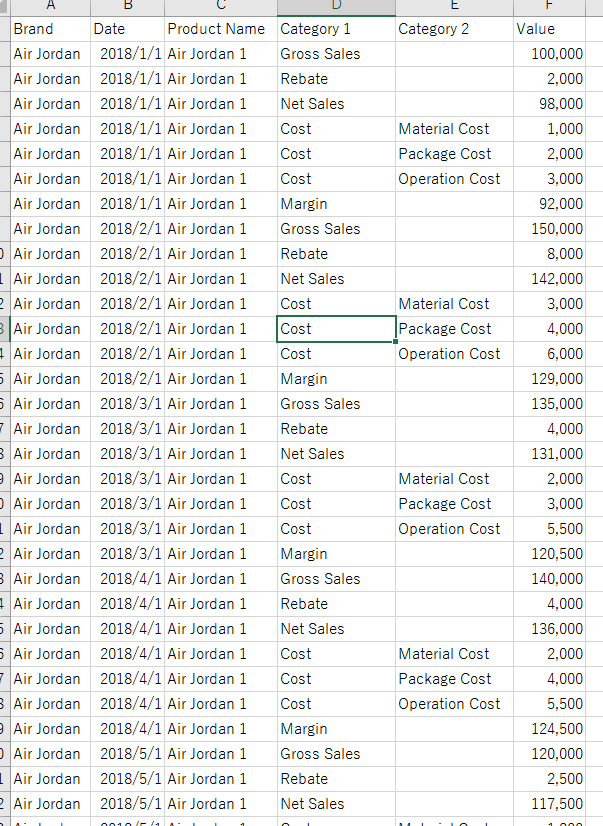
Please find below as sample data set.
What I would like to do is to
↓Original
↓Final Outcome to be
If you could help me on this, that would be great.
Many thanks,
H
Solved! Go to Solution.
Hi @hidenseek9
Go to the Edit Query option in Home Tab under Ribbon Pallet and follow the steps-
1. Add a Conditional Column with the following Condition
Cost=If Category2 equals null then Category1 otherwise Category2
2. Removed Category1 and Category2 Column.
3. Pivot the Cost Column.
For more details see the pbix file.
Hi @hidenseek9
Go to the Edit Query option in Home Tab under Ribbon Pallet and follow the steps-
1. Add a Conditional Column with the following Condition
Cost=If Category2 equals null then Category1 otherwise Category2
2. Removed Category1 and Category2 Column.
3. Pivot the Cost Column.
For more details see the pbix file.
@Anonymous
Thank you for the solution. It works perfect!
H
Join us in Barcelona for FabCon and SQLCon, the Fabric, Power BI, SQL, and AI community event. Save €200 with code FABCMTY200.
| User | Count |
|---|---|
| 24 | |
| 22 | |
| 20 | |
| 18 | |
| 14 |
| User | Count |
|---|---|
| 32 | |
| 26 | |
| 23 | |
| 20 | |
| 20 |