
cancel
Showing results for 
Search instead for 
Did you mean: 

July 7 - July 17 | Round 2 of the Power BI Dataviz World Championships. Don't miss your chance! Learn more

Reply
hidenseek9
Post Patron
Post Patron

Help needed with Edit Query mode

Hello Power BI Community,


I have an issue with merging columns together in "edit query" mode.

If you could help me with this, it will be much appreciated.


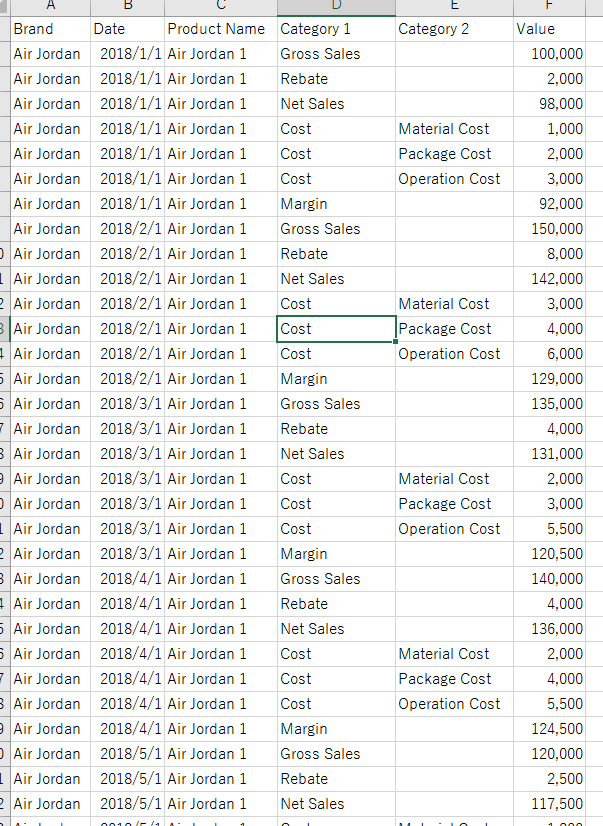
Please find below as sample data set.

Sample Data


What I would like to do is to

  • Download "Original Data" to Power BI and in "edit query" mode, make a new column, merging "Category 1" and "Category 2" and unpivot the file to make "Final Outcome" data. (If Category 2 is blank then reflect Category 1)

↓Original

2018-10-05 11_11_19-181005_Sample Data.xlsx - Excel.png


↓Final Outcome to be

2018-10-05 11_10_42-181005_Sample Data.xlsx - Excel.png


If you could help me on this, that would be great.


Many thanks,


H

1 ACCEPTED SOLUTION
Anonymous
Not applicable

Hi @hidenseek9

Go to the Edit Query option in Home Tab under Ribbon Pallet and follow the steps-

1. Add a Conditional Column with the following Condition

     Cost=If Category2 equals null then Category1 otherwise Category2

2. Removed Category1 and Category2 Column.

3. Pivot the Cost Column.


For more details see the pbix file.

Download pbix file

View solution in original post

2 REPLIES 2
Anonymous
Not applicable

Hi @hidenseek9

Go to the Edit Query option in Home Tab under Ribbon Pallet and follow the steps-

1. Add a Conditional Column with the following Condition

     Cost=If Category2 equals null then Category1 otherwise Category2

2. Removed Category1 and Category2 Column.

3. Pivot the Cost Column.


For more details see the pbix file.

Download pbix file

@Anonymous


Thank you for the solution. It works perfect!


H

Helpful resources

Announcements
FabCon and SQLCon Barcelona 2026

FabCon & SQLCon – Barcelona 2026

Join us in Barcelona for FabCon and SQLCon, the Fabric, Power BI, SQL, and AI community event. Save €200 with code FABCMTY200.

60 days of Data Days Carousel

Data Days 2026

Join Fabric Data Days 2026: 60 days of free live/on-demand sessions, challenges, study groups, and certification opportunities.

Power BI DataViz World Championships carousel

Power BI DataViz World Championships - June 2026

A new Power BI DataViz World Championship is coming this June! Don't miss out on submitting your entry.