
Get certified for free when you join Fabric Data Days 2026 and dive into Fabric, Power BI, SQL, AI, and other essential data skills.
Join nowTry your skills in the Power BI Dataviz World Championship! Round one ends June 26. Join now
Hello Power BI Community,
I have an issue with merging columns together in "edit query" mode.
If you could help me with this, it will be much appreciated.
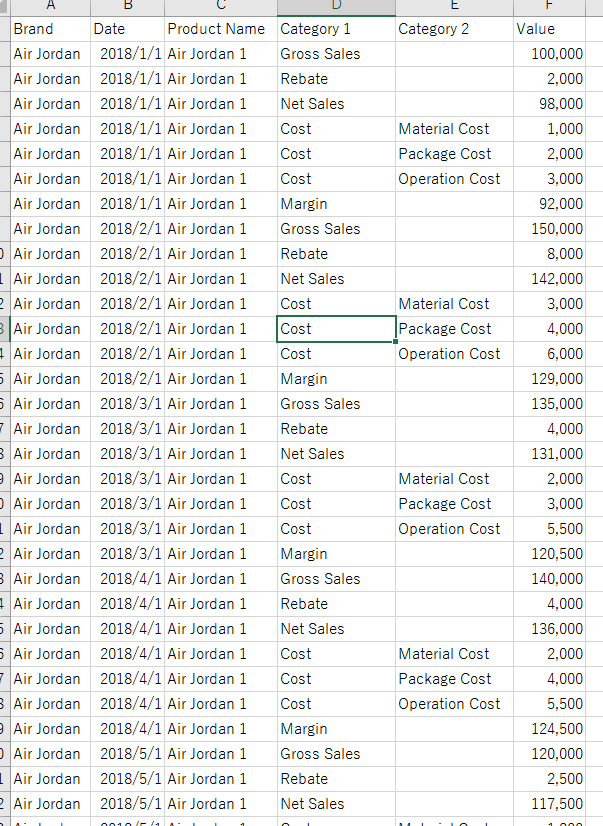
Please find below as sample data set.
What I would like to do is to
↓Original
↓Final Outcome to be
If you could help me on this, that would be great.
Many thanks,
H
Solved! Go to Solution.
Hi @hidenseek9
Go to the Edit Query option in Home Tab under Ribbon Pallet and follow the steps-
1. Add a Conditional Column with the following Condition
Cost=If Category2 equals null then Category1 otherwise Category2
2. Removed Category1 and Category2 Column.
3. Pivot the Cost Column.
For more details see the pbix file.
Hi @hidenseek9
Go to the Edit Query option in Home Tab under Ribbon Pallet and follow the steps-
1. Add a Conditional Column with the following Condition
Cost=If Category2 equals null then Category1 otherwise Category2
2. Removed Category1 and Category2 Column.
3. Pivot the Cost Column.
For more details see the pbix file.
@Anonymous
Thank you for the solution. It works perfect!
H
| User | Count |
|---|---|
| 24 | |
| 22 | |
| 22 | |
| 21 | |
| 13 |
| User | Count |
|---|---|
| 66 | |
| 56 | |
| 45 | |
| 45 | |
| 30 |