Get certified for free when you join Fabric Data Days 2026 and dive into Fabric, Power BI, SQL, AI, and other essential data skills.
Join nowJuly 28 - August 9 | Final Round of the Power BI Dataviz World Championships. This is your chance. Learn more
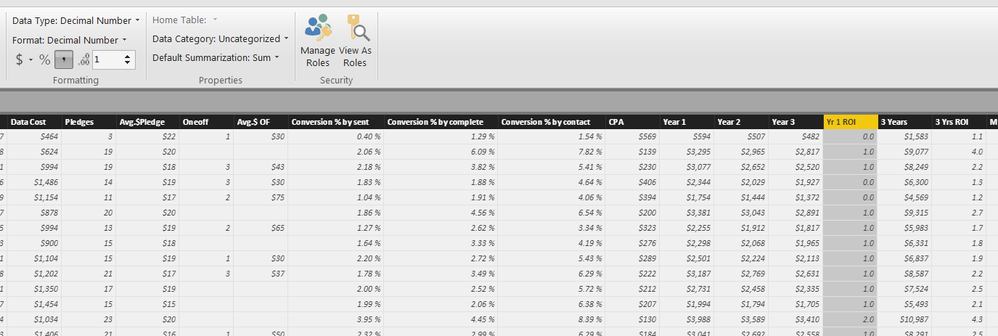
My "Yr 1 ROI" become 0.0 or 1.0 or 2.0, although the original data is correct. My "3 Yrs ROI" is exactly the same format but show up properly.
any1 know why?
Hi @Anonymous,
Could you please describe more details about your scenario? We need to know the data type of "Yr 1 ROI" column in your source file and if you make any changes for the column in Power BI Desktop.
Based on my test, if you change the type of "Yr 1 ROI" column to whole number and then Decimal number in Data View of Power BI Desktop, the "Yr 1 ROI" column will not show up properly.
Thanks,
Lydia Zhang
"Yr 1 ROI" column in source file = Number
"Yr 1 ROI" column in PBI = Decimal Number
they are probably on whole number before, but I changed them back. "3 Yrs ROI" works fine but not "Yr 1 ROI", they are same calculation and format in both excel and PBI.
Hi , can you attach a small data set?
Fabio
@fabiocesarei how to attach data set? i've got a small sample in excel, how can i attach it here?
many thanks.
hi, I do not find the button "attach", try to load it on google drive or the like and enter the share link
hello , can you bring the real value of the field and the format of the column on the table ?
Join us in Barcelona for FabCon and SQLCon, the Fabric, Power BI, SQL, and AI community event. Save €200 with code FABCMTY200.
If you love stickers, then you will definitely want to check out our community sticker challenge, Barcelona edition!
Check out the July 2026 Power BI update to learn about new features.
| User | Count |
|---|---|
| 31 | |
| 28 | |
| 24 | |
| 24 | |
| 19 |
| User | Count |
|---|---|
| 44 | |
| 31 | |
| 17 | |
| 17 | |
| 15 |