Join us at FabCon Atlanta from March 16 - 20, 2026, for the ultimate Fabric, Power BI, AI and SQL community-led event. Save $200 with code FABCOMM.
Register now!The Power BI Data Visualization World Championships is back! Get ahead of the game and start preparing now! Learn more
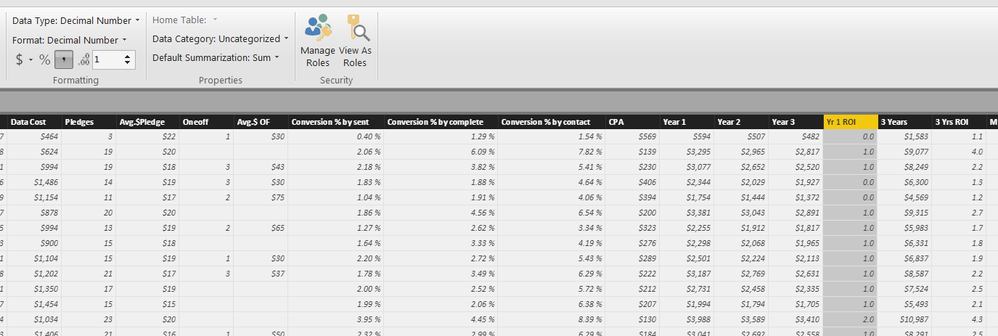
My "Yr 1 ROI" become 0.0 or 1.0 or 2.0, although the original data is correct. My "3 Yrs ROI" is exactly the same format but show up properly.
any1 know why?
Hi @Anonymous,
Could you please describe more details about your scenario? We need to know the data type of "Yr 1 ROI" column in your source file and if you make any changes for the column in Power BI Desktop.
Based on my test, if you change the type of "Yr 1 ROI" column to whole number and then Decimal number in Data View of Power BI Desktop, the "Yr 1 ROI" column will not show up properly.
Thanks,
Lydia Zhang
"Yr 1 ROI" column in source file = Number
"Yr 1 ROI" column in PBI = Decimal Number
they are probably on whole number before, but I changed them back. "3 Yrs ROI" works fine but not "Yr 1 ROI", they are same calculation and format in both excel and PBI.
Hi , can you attach a small data set?
Fabio
@fabiocesarei how to attach data set? i've got a small sample in excel, how can i attach it here?
many thanks.
hi, I do not find the button "attach", try to load it on google drive or the like and enter the share link
hello , can you bring the real value of the field and the format of the column on the table ?
The Power BI Data Visualization World Championships is back! Get ahead of the game and start preparing now!
| User | Count |
|---|---|
| 38 | |
| 36 | |
| 33 | |
| 32 | |
| 29 |
| User | Count |
|---|---|
| 129 | |
| 88 | |
| 79 | |
| 68 | |
| 63 |