Get certified for free when you join Fabric Data Days 2026 and dive into Fabric, Power BI, SQL, AI, and other essential data skills.
Join nowJuly 7 - July 17 | Round 2 of the Power BI Dataviz World Championships. Don't miss your chance! Learn more
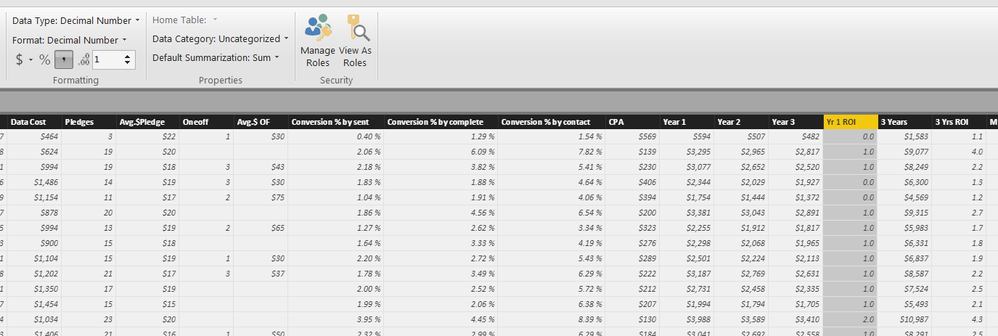
My "Yr 1 ROI" become 0.0 or 1.0 or 2.0, although the original data is correct. My "3 Yrs ROI" is exactly the same format but show up properly.
any1 know why?
Hi @Anonymous,
Could you please describe more details about your scenario? We need to know the data type of "Yr 1 ROI" column in your source file and if you make any changes for the column in Power BI Desktop.
Based on my test, if you change the type of "Yr 1 ROI" column to whole number and then Decimal number in Data View of Power BI Desktop, the "Yr 1 ROI" column will not show up properly.
Thanks,
Lydia Zhang
"Yr 1 ROI" column in source file = Number
"Yr 1 ROI" column in PBI = Decimal Number
they are probably on whole number before, but I changed them back. "3 Yrs ROI" works fine but not "Yr 1 ROI", they are same calculation and format in both excel and PBI.
Hi , can you attach a small data set?
Fabio
@fabiocesarei how to attach data set? i've got a small sample in excel, how can i attach it here?
many thanks.
hi, I do not find the button "attach", try to load it on google drive or the like and enter the share link
hello , can you bring the real value of the field and the format of the column on the table ?
Join us in Barcelona for FabCon and SQLCon, the Fabric, Power BI, SQL, and AI community event. Save €200 with code FABCMTY200.
Join Data Days 2026: 60 days of free live/on-demand sessions, challenges, study groups, and certification opportunities.
| User | Count |
|---|---|
| 27 | |
| 23 | |
| 18 | |
| 18 | |
| 15 |
| User | Count |
|---|---|
| 54 | |
| 44 | |
| 42 | |
| 39 | |
| 36 |