Join us at FabCon Atlanta from March 16 - 20, 2026, for the ultimate Fabric, Power BI, AI and SQL community-led event. Save $200 with code FABCOMM.
Register now!The Power BI Data Visualization World Championships is back! Get ahead of the game and start preparing now! Learn more
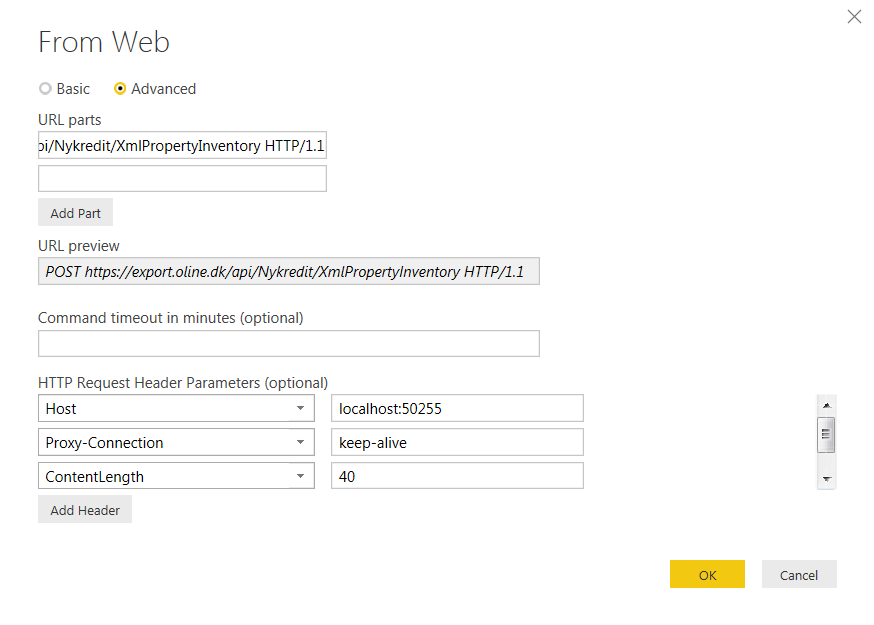
I'm new in Power BI and need some help retrieving data via API. I have tried to insert the parateters below in Get Data / Web / Advanced with no success at all.
POST https://export.oline.dk/api/Nykredit/XmlPropertyInventory HTTP/1.1
Host: localhost:50255
Proxy-Connection: keep-alive
Content-Length: 40
Cache-Control: no-cache
Origin: chrome-extension://fhbjgbiflinjbdggehcddcbncdddomop
Content-Type: application/json
User-Agent: Mozilla/5.0 (Windows NT 6.1; WOW64) AppleWebKit/537.36 (KHTML, like Gecko) Chrome/46.0.2490.86 Safari/537.36
Postman-Token: bbbbe2e0-efe5-f0d0-9b5f-ff12b07a7698
Accept: */*
Accept-Encoding: gzip, deflate
Accept-Language: da-DK,da;q=0.8,en-US;q=0.6,en;q=0.4
Parameters must be insert in BODY:
{
"UserName":"<UserName>","Password":"<Password>","FromDate":"09-01-2015","ToDate":"11-30-2015"
}
Hi @OleGyldenloeve,
From the picture you posted above, I notice that you're using "POST https://export.oline.dk/api/Nykredit/XmlPropertyIn
In addition, following are some similar threads for your reference:
http://stackoverflow.com/questions/36685463/how-to-connect-my-web-api-wtih-power-bi-reports
Regards
The Power BI Data Visualization World Championships is back! Get ahead of the game and start preparing now!
| User | Count |
|---|---|
| 158 | |
| 132 | |
| 116 | |
| 79 | |
| 54 |