Get certified for free when you join Fabric Data Days 2026 and dive into Fabric, Power BI, SQL, AI, and other essential data skills.
Join nowJuly 7 - July 17 | Round 2 of the Power BI Dataviz World Championships. Don't miss your chance! Learn more
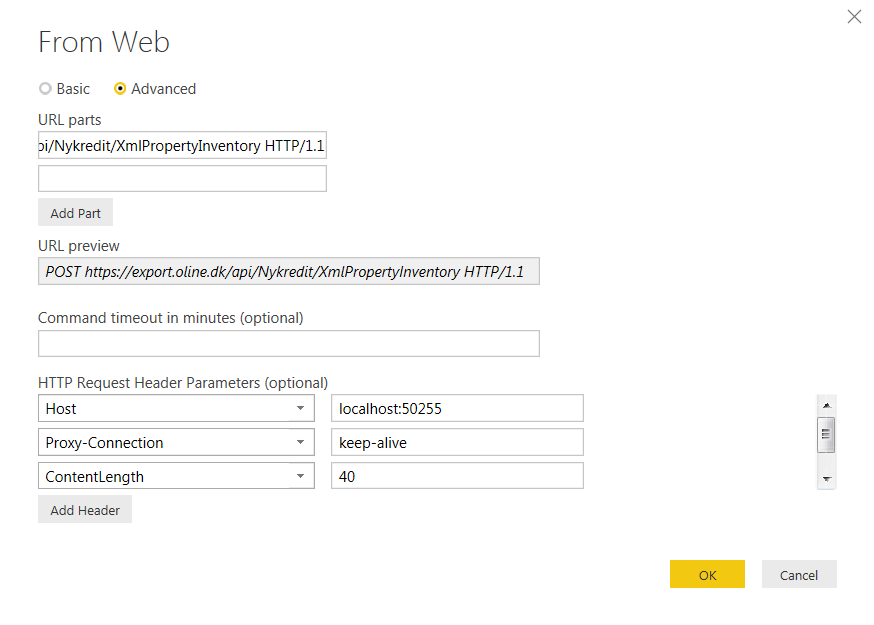
I'm new in Power BI and need some help retrieving data via API. I have tried to insert the parateters below in Get Data / Web / Advanced with no success at all.
POST https://export.oline.dk/api/Nykredit/XmlPropertyInventory HTTP/1.1
Host: localhost:50255
Proxy-Connection: keep-alive
Content-Length: 40
Cache-Control: no-cache
Origin: chrome-extension://fhbjgbiflinjbdggehcddcbncdddomop
Content-Type: application/json
User-Agent: Mozilla/5.0 (Windows NT 6.1; WOW64) AppleWebKit/537.36 (KHTML, like Gecko) Chrome/46.0.2490.86 Safari/537.36
Postman-Token: bbbbe2e0-efe5-f0d0-9b5f-ff12b07a7698
Accept: */*
Accept-Encoding: gzip, deflate
Accept-Language: da-DK,da;q=0.8,en-US;q=0.6,en;q=0.4
Parameters must be insert in BODY:
{
"UserName":"<UserName>","Password":"<Password>","FromDate":"09-01-2015","ToDate":"11-30-2015"
}
Hi @OleGyldenloeve,
From the picture you posted above, I notice that you're using "POST https://export.oline.dk/api/Nykredit/XmlPropertyIn
In addition, following are some similar threads for your reference:
http://stackoverflow.com/questions/36685463/how-to-connect-my-web-api-wtih-power-bi-reports
Regards
Join us in Barcelona for FabCon and SQLCon, the Fabric, Power BI, SQL, and AI community event. Save €200 with code FABCMTY200.
If you love stickers, then you will definitely want to check out our community sticker challenge, Barcelona edition!
Check out the July 2026 Power BI update to learn about new features.
| User | Count |
|---|---|
| 30 | |
| 26 | |
| 23 | |
| 23 | |
| 14 |
| User | Count |
|---|---|
| 47 | |
| 33 | |
| 20 | |
| 18 | |
| 16 |