Share feedback directly with Fabric product managers, participate in targeted research studies and influence the Fabric roadmap.
Sign up nowGet Fabric certified for FREE! Don't miss your chance! Learn more
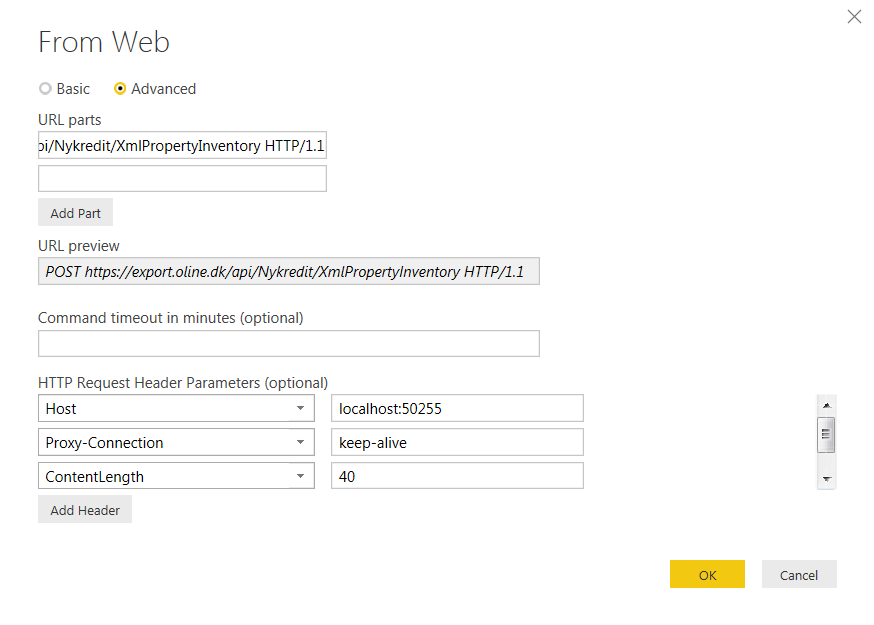
I'm new in Power BI and need some help retrieving data via API. I have tried to insert the parateters below in Get Data / Web / Advanced with no success at all.
POST https://export.oline.dk/api/Nykredit/XmlPropertyInventory HTTP/1.1
Host: localhost:50255
Proxy-Connection: keep-alive
Content-Length: 40
Cache-Control: no-cache
Origin: chrome-extension://fhbjgbiflinjbdggehcddcbncdddomop
Content-Type: application/json
User-Agent: Mozilla/5.0 (Windows NT 6.1; WOW64) AppleWebKit/537.36 (KHTML, like Gecko) Chrome/46.0.2490.86 Safari/537.36
Postman-Token: bbbbe2e0-efe5-f0d0-9b5f-ff12b07a7698
Accept: */*
Accept-Encoding: gzip, deflate
Accept-Language: da-DK,da;q=0.8,en-US;q=0.6,en;q=0.4
Parameters must be insert in BODY:
{
"UserName":"<UserName>","Password":"<Password>","FromDate":"09-01-2015","ToDate":"11-30-2015"
}
Hi @OleGyldenloeve,
From the picture you posted above, I notice that you're using "POST https://export.oline.dk/api/Nykredit/XmlPropertyIn
In addition, following are some similar threads for your reference:
http://stackoverflow.com/questions/36685463/how-to-connect-my-web-api-wtih-power-bi-reports
Regards
If you love stickers, then you will definitely want to check out our Community Sticker Challenge!
Check out the January 2026 Power BI update to learn about new features.
| User | Count |
|---|---|
| 65 | |
| 65 | |
| 45 | |
| 21 | |
| 18 |
| User | Count |
|---|---|
| 115 | |
| 114 | |
| 38 | |
| 36 | |
| 26 |