cancel
Showing results for 
Search instead for 
Did you mean: 

Learn from the best! Meet the four finalists headed to the FINALS of the Power BI Dataviz World Championships! Register now

Reply
OleGyldenloeve
New Member

Get data via API

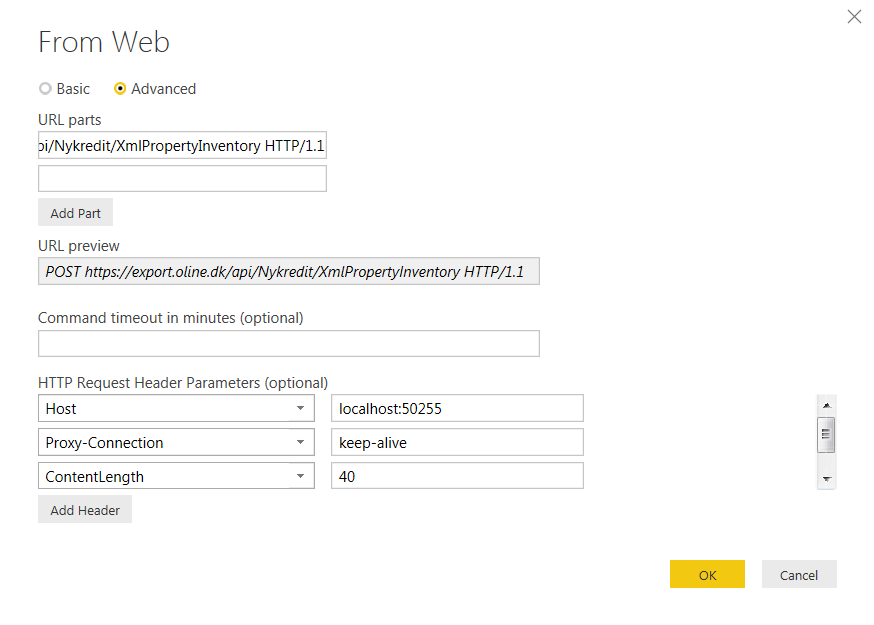
I'm new in Power BI and need some help retrieving data via API. I have tried to insert the parateters below in Get Data / Web / Advanced with no success at all.

PBID_API.png


POST https://export.oline.dk/api/Nykredit/XmlPropertyInventory HTTP/1.1

Host: localhost:50255

Proxy-Connection: keep-alive

Content-Length: 40

Cache-Control: no-cache

Origin: chrome-extension://fhbjgbiflinjbdggehcddcbncdddomop

Content-Type: application/json

User-Agent: Mozilla/5.0 (Windows NT 6.1; WOW64) AppleWebKit/537.36 (KHTML, like Gecko) Chrome/46.0.2490.86 Safari/537.36

Postman-Token: bbbbe2e0-efe5-f0d0-9b5f-ff12b07a7698

Accept: */*

Accept-Encoding: gzip, deflate

Accept-Language: da-DK,da;q=0.8,en-US;q=0.6,en;q=0.4


Parameters must be insert in BODY:

{

    "UserName":"<UserName>","Password":"<Password>","FromDate":"09-01-2015","ToDate":"11-30-2015"

}

1 REPLY 1
v-ljerr-msft
Microsoft Employee
Microsoft Employee

Hi @OleGyldenloeve,


From the picture you posted above, I notice that you're using "POST https://export.oline.dk/api/Nykredit/XmlPropertyInventory HTTP/1" in the URL part which is in a wrong format. 


In addition, following are some similar threads for your reference:

http://stackoverflow.com/questions/36685463/how-to-connect-my-web-api-wtih-power-bi-reports

https://social.msdn.microsoft.com/Forums/en-US/61ece381-49b9-48e5-a70b-5e35016c28ac/webcontents-and-...


Regards

Helpful resources

Announcements
Power BI DataViz World Championships carousel

Power BI DataViz World Championships - June 2026

A new Power BI DataViz World Championship is coming this June! Don't miss out on submitting your entry.

Join our Fabric User Panel

Join our Fabric User Panel

Share feedback directly with Fabric product managers, participate in targeted research studies and influence the Fabric roadmap.

March Power BI Update Carousel

Power BI Community Update - March 2026

Check out the March 2026 Power BI update to learn about new features.