cancel
Showing results for 
Search instead for 
Did you mean: 

July 7 - July 17 | Round 2 of the Power BI Dataviz World Championships. Don't miss your chance! Learn more

Reply
Anonymous
Not applicable

External Data Automatic Refresh

Hello everybody,

The reason why Im writing here could be pretty basic but still, since im starting to use Power BI, I would use some help about it.

I made a pretty basic inform with Power BI Desktop, and I connected it with an external web URL (Chilean Central Bank) since I wanna know some finnancial indicators (currencies, commodities and stuff) that changes every minute/hour/day.
The link works, and everytime I push the refresh buttom, whether at Power BI Online or Deskptop, it changes the indicators in the inform, so everything's good.

However, I also tried to program an automatic refresh of these indicatores, setting the options through Power BI Online: selecting an anonymous auth metod and none privacy level, since is a public web page. I also set 2 different hours for the automatic refresh, but in any of those 2 attemps, the refresing process dosnt work and I get the following message: https://pasteboard.co/IKuqHMv.png

But, again, if i try to refresh the data manually, it works perfects.

Does anyone know why the automatic refresh isnt work? Am I missing a step if im trying to catch and refresh data from a public web page?

Thanks in advance for your help.
Best Regards,
Cristóbal

1 ACCEPTED SOLUTION
Anonymous
Not applicable

Hi @Anonymous ,


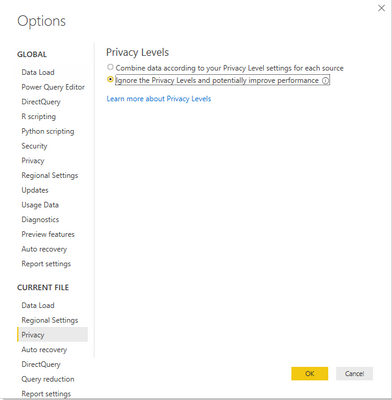
Please try setting the Privacy Levels in Power BI Desktop as below:

1.PNG


Best Regards,

Jay

Community Support Team _ Jay Wang

If this post helps, then please consider Accept it as the solution to help the other members find it more quickly.

View solution in original post

3 REPLIES 3
Anonymous
Not applicable

Hi @Anonymous ,


Please try setting the Privacy Levels in Power BI Desktop as below:

1.PNG


Best Regards,

Jay

Community Support Team _ Jay Wang

If this post helps, then please consider Accept it as the solution to help the other members find it more quickly.

Anonymous
Not applicable

Thank you very much Jay @Anonymous, it worked perfectly. 

As I thought, it was pretty basic.


Best regards,

Cristóbal

Anonymous
Not applicable

somewhat similar issue, 

Created excel file with 2 sheets of plain table data and 3 sheets with pivot table connecting to tabular model(external data connection). Developed Power Bi report off of this file and published in workspace. 


This file is saved in sharepoint site but need help to understand how this file can be refreshed automatically including the data refresh, so that power bi displays latest data.


has anyone come across this issue? 

Helpful resources

Announcements
FabCon and SQLCon Barcelona 2026

FabCon & SQLCon – Barcelona 2026

Join us in Barcelona for FabCon and SQLCon, the Fabric, Power BI, SQL, and AI community event. Save €200 with code FABCMTY200.

60 days of Data Days Carousel

Data Days 2026

Join Data Days 2026: 60 days of free live/on-demand sessions, challenges, study groups, and certification opportunities.

Power BI DataViz World Championships carousel

Power BI DataViz World Championships - June 2026

A new Power BI DataViz World Championship is coming this June! Don't miss out on submitting your entry.

Top Solution Authors