This time we’re going bigger than ever. Fabric, Power BI, SQL, AI and more. We're covering it all. You won't want to miss it.
Learn moreGet Fabric Certified for FREE during AI Skills Fest. This week only. Secure your voucher now.
Hi All,
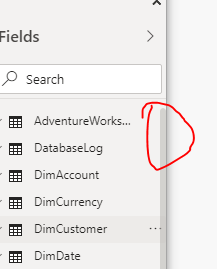
Is there any way to make the Fields pane vertical scroll bar bigger/thicker? Since it is on the far left of the window in PBI Desktop it gets cut down in width and when running it in your Teams app it cuts it even thinner and makes it almost impossible to grab and scroll vertically.
Thanks!
Solved! Go to Solution.
Yes, that is the one. What is happening is Power BI Desktop draws past the boarder on the right side of it's window and the higher the screen resolution the worse it gets. Added on top of that the use of Teams makes it worse since the Teams window for some reason obscures the scrollbar even more making it impossible to use.
Thanks I would say a bug rather than an idea.
Hi @Anonymous ,
Is it this one?
It's impossible to solve it in current version, maybe you can submit an idea .
Best regards,
Lionel Chen
If this post helps, then please consider Accept it as the solution to help the other members find it more quickly.
Yes, that is the one. What is happening is Power BI Desktop draws past the boarder on the right side of it's window and the higher the screen resolution the worse it gets. Added on top of that the use of Teams makes it worse since the Teams window for some reason obscures the scrollbar even more making it impossible to use.
Thanks I would say a bug rather than an idea.
Thanks the other suggestion about "submit idea" showed there were a lot of people citing this issue so I decided to list it as a bug since I can do that. That seemed the only path to take.
Check out the May 2026 Power BI update to learn about new features.
Sign up to receive a private message when registration opens and key events begin.
If you have recently started exploring Fabric, we'd love to hear how it's going. Your feedback can help with product improvements.
| User | Count |
|---|---|
| 24 | |
| 24 | |
| 21 | |
| 21 | |
| 18 |
| User | Count |
|---|---|
| 56 | |
| 52 | |
| 49 | |
| 26 | |
| 25 |