Join us in Barcelona for FabCon and SQLCon, September 28 - October 1, 2026.
This is best Fabric, Power BI, SQL and AI community event. How do we know? The last event sold out! Save €200 with code FABCMTY200.
Register now- Power BI forums
- Get Help with Power BI
- Desktop
- Service
- Report Server
- Power Query
- Mobile Apps
- Developer
- DAX Commands and Tips
- Custom Visuals Development Discussion
- Health and Life Sciences
- Power BI Spanish forums
- Translated Spanish Desktop
- Training and Consulting
- Instructor Led Training
- Dashboard in a Day for Women, by Women
- Galleries
- Data Stories Gallery
- Themes Gallery
- Contests Gallery
- QuickViz Gallery
- Quick Measures Gallery
- Visual Calculations Gallery
- Fabric Apps Gallery
- Notebook Gallery
- Translytical Task Flow Gallery
- TMDL Gallery
- R Script Showcase
- Webinars and Video Gallery
- Ideas
- Custom Visuals Ideas (read-only)
- Issues
- Issues
- Events
- Upcoming Events
The Fabric community is upgrading! Read all of the details including the timeline and what you can expect. Learn more
- Power BI forums
- Forums
- Get Help with Power BI
- Desktop
- Dynamic RLS with USERNAME()
- Subscribe to RSS Feed
- Mark Topic as New
- Mark Topic as Read
- Float this Topic for Current User
- Bookmark
- Subscribe
- Printer Friendly Page

- Mark as New
- Bookmark
- Subscribe
- Mute
- Subscribe to RSS Feed
- Permalink
- Report Inappropriate Content
Dynamic RLS with USERNAME()
Hi everyone,
I am having an issue using USERNAME() to create a dynamic RLS. Below is the link to my PBIX.
I am puzzled as to why I can't get the dynamic RLS to function. If you can give me a friendly nudge, I would greatly appreciate it.
Luis


Solved! Go to Solution.
- Mark as New
- Bookmark
- Subscribe
- Mute
- Subscribe to RSS Feed
- Permalink
- Report Inappropriate Content
Got it to work.
Watch out for the quotation marks.
By default, the DAX will be [Username] = "USERNAME()"
To work properly, the DAX should be [Username] = USERNAME()

- Mark as New
- Bookmark
- Subscribe
- Mute
- Subscribe to RSS Feed
- Permalink
- Report Inappropriate Content
Maintaining data security has become a crucial requirement for businesses today, especially when dealing with BI reporting. With the increasing number of roles involved in data access, managing row-level security (RLS) has become a complex task. In order to provide secure and filtered data access to each role, businesses need to establish a set of filtering dimensions that would be applied to each role. These dimensions could range from profit centers to sales organizations or even trader/buyer codes. The challenge is to create a system that effectively manages these dimensions for each role and ensures their automatic application when users log into each report. Therefore, the question arises - how can businesses create an efficient RLS system that provides secure and filtered data access to each role, without compromising on the performance of BI reporting?

- Mark as New
- Bookmark
- Subscribe
- Mute
- Subscribe to RSS Feed
- Permalink
- Report Inappropriate Content
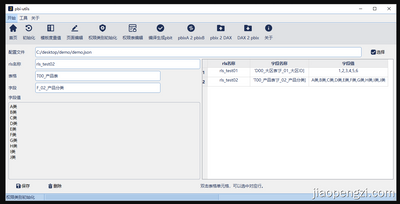
You can use the tool I developed to manage RLS. The connection between dynamically decoupled RLS and PBIX can be directly managed externally.
The tool supports both Chinese and English.
Tool URL:https://github.com/jiaopengzi/pbi-utils
- Mark as New
- Bookmark
- Subscribe
- Mute
- Subscribe to RSS Feed
- Permalink
- Report Inappropriate Content
Got it to work.
Watch out for the quotation marks.
By default, the DAX will be [Username] = "USERNAME()"
To work properly, the DAX should be [Username] = USERNAME()
Helpful resources

FabCon & SQLCon – Barcelona 2026
Join us in Barcelona for FabCon and SQLCon, the Fabric, Power BI, SQL, and AI community event. Save €200 with code FABCMTY200.

Power BI DataViz World Championships - June 2026
A new Power BI DataViz World Championship is coming this June! Don't miss out on submitting your entry.

| User | Count |
|---|---|
| 24 | |
| 22 | |
| 19 | |
| 17 | |
| 14 |


| User | Count |
|---|---|
| 44 | |
| 36 | |
| 23 | |
| 20 | |
| 20 |


