Join us at FabCon Atlanta from March 16 - 20, 2026, for the ultimate Fabric, Power BI, AI and SQL community-led event. Save $200 with code FABCOMM.
Register now!The Power BI Data Visualization World Championships is back! It's time to submit your entry. Live now!
I have a parameter I am trying to create in order to determine the revenue associated with a dynamic number of customers. This formula gives me all of the revenue rather than limiting it to the number of customers selected by the parameter. How would I fix this?
Top N =
Calculate(sum([Rev]),
TopN(Parameter Value, VALUES([Customer Rank]), sum([Rev]), ASC)
)
Hi @czuniga ,
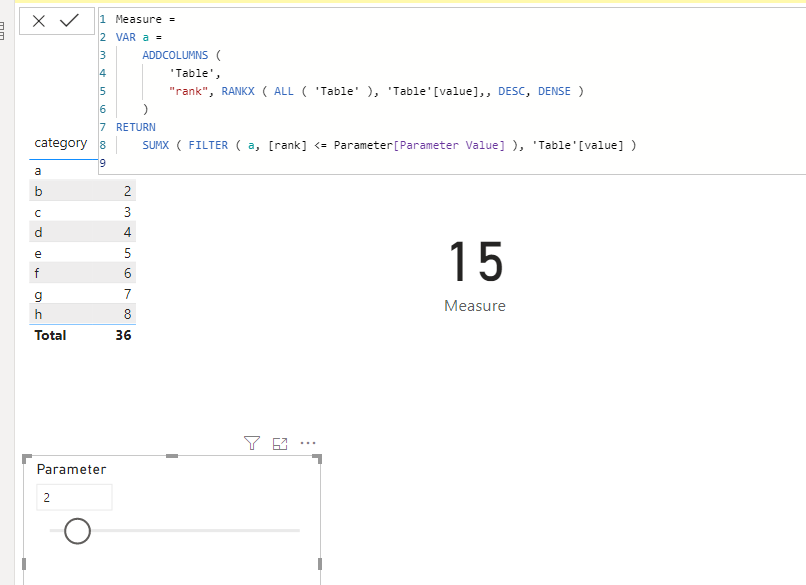
We can create a measure as below to work on it.
Measure =
VAR a =
ADDCOLUMNS (
'Table',
"rank", RANKX ( ALL ( 'Table' ), 'Table'[value],, DESC, DENSE )
)
RETURN
SUMX ( FILTER ( a, [rank] <= Parameter[Parameter Value] ), 'Table'[value] )
Pbix as attached.
Hi @czuniga ,
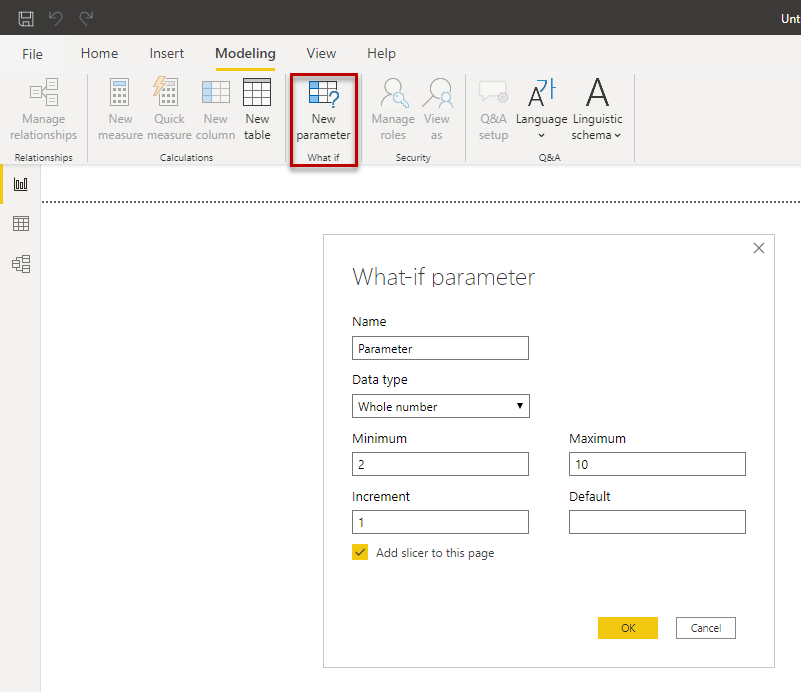
use the what-if parameter, see figure. It creates a new table with a measure. Insert this measure in your TopN measure.
Regards FrankAT
The Power BI Data Visualization World Championships is back! It's time to submit your entry.
Check out the January 2026 Power BI update to learn about new features.
| User | Count |
|---|---|
| 56 | |
| 42 | |
| 39 | |
| 23 | |
| 21 |
| User | Count |
|---|---|
| 144 | |
| 106 | |
| 63 | |
| 38 | |
| 31 |